

The browser, for decades a passive window into the web, is being fundamentally reimagined. No longer just a vessel for displaying pages, the modern AI-powered browser aspires to become an active participant in how we research, create, and complete tasks online. A showdown between two platforms has emerged at the forefront of this transformation: OpenAI’s ChatGPT Atlas vs Perplexity Comet. Both promise to revolutionize browsing, but they approach the problem from radically different philosophical starting points. Understanding these differences matters now more than ever, as the tools we choose to navigate information will shape how we work, learn, and make decisions in an increasingly complex digital landscape.
Having spent considerable time testing both browsers in real-world workflows, the contrasts become immediately apparent. Atlas feels like a conversational companion that anticipates your needs and executes tasks on your behalf. Comet, by contrast, operates as a meticulous research librarian, synthesizing complex information with transparent sourcing. The question isn’t which browser is objectively better, it’s which philosophy aligns with how you think and work.
- The Philosophical Divide: Action vs Intelligence
- Interface Design and User Experience
- Memory, Context, and Personalization
- The Cognitive Load Question: A Missing Angle
- Performance, Availability, and Practical Considerations
- Privacy, Security, and Trust
- Use Cases and Ideal Users
- The Broader Implications for Web Interaction
- What Comes Next
The Philosophical Divide: Action vs Intelligence
The fundamental difference between these AI browsers lies in their core purpose. ChatGPT Atlas views the web as a series of tasks waiting to be delegated. Its flagship feature, Agent Mode, allows the browser to execute complex, multi-step actions autonomously. Ask Atlas to find the best-reviewed noise-canceling headphones under a specific budget, compare their features across multiple retailers, and initiate a purchase, and it will navigate e-commerce sites, parse reviews, fill comparison tables, and begin checkout without additional input. This transforms the browser from a viewing tool into what OpenAI calls a “command center” for digital life.
Perplexity Comet takes an entirely different approach, treating the web as a knowledge synthesis engine. Rather than focusing on doing things for you, Comet excels at organizing, analyzing, and delivering cited information across multiple sources. Its strength lies in taking disparate information from a dozen open tabs and weaving them into a unified, sourced answer. For anyone whose primary goal online is processing complex information, whether academic research, competitive analysis, or investigative journalism, Comet’s architecture feels purpose-built for that cognitive work.
This distinction between action and intelligence isn’t merely technical. It reflects two competing visions of what AI assistance should mean. Atlas says, “Let me do that for you.” Comet says, “Let me help you understand that better.” Both approaches have merit, but they serve fundamentally different use cases.
Interface Design and User Experience
The UX differences between Atlas and Comet reveal their contrasting priorities with striking clarity. ChatGPT Atlas features a persistent conversational sidebar that sits alongside your browsing content. The interface maintains a side-by-side layout where ChatGPT acts as a co-pilot, always available but never intrusive. The search bar itself defaults to a conversational prompt box, yielding AI-generated answers alongside traditional search results. A particularly clever feature called Cursor Chat allows users to click into any text field, like an email draft or form, and receive inline AI suggestions for rewriting, expanding, or editing content without leaving the page.
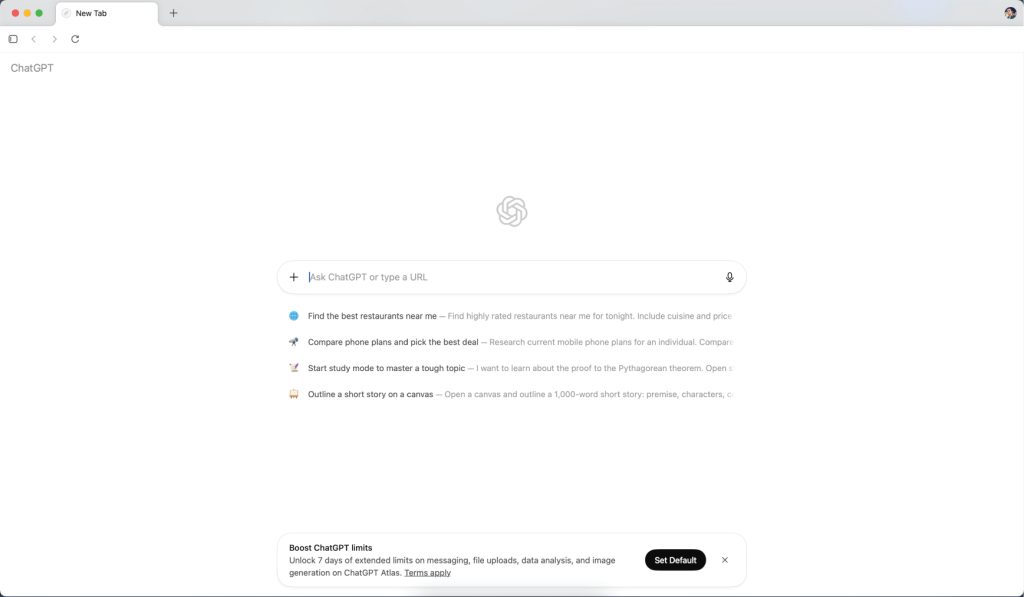
Atlas’s home screen deliberately mirrors familiar browser conventions while embedding AI at every interaction point. When you open a new tab, you’re greeted with a ChatGPT-style interface prompting “Ask a question or enter a URL.” This dual-purpose input field collapses the distinction between search and conversation, a design choice that feels intuitive once you internalize it. Toggle views let you switch between chat responses and traditional search verticals like images, videos, and news. The minimalist interface, which some find almost sterile, actually reduces cognitive load by eliminating visual noise and keeping focus on content and conversation.
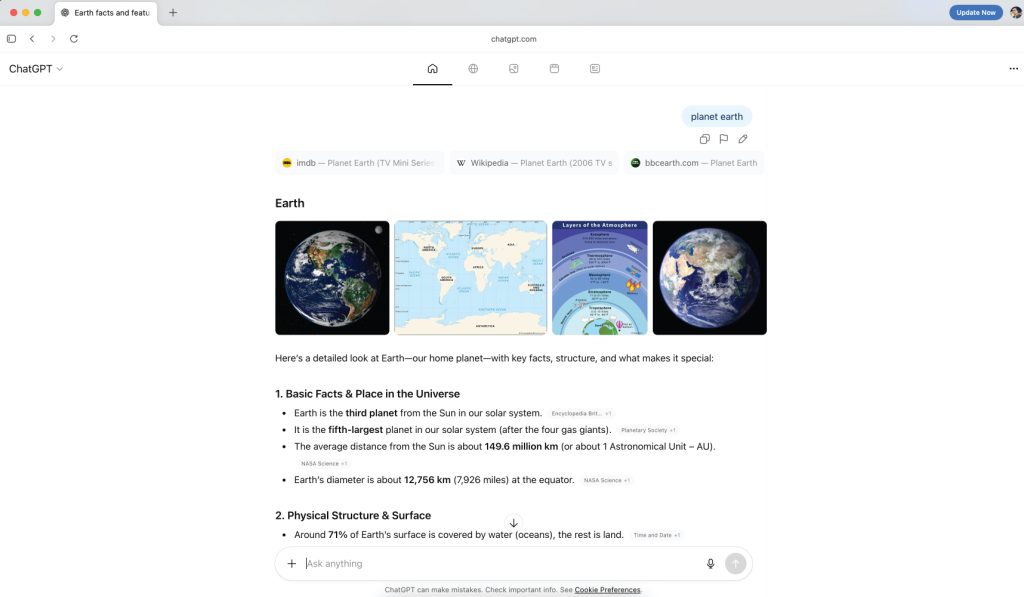
Perplexity Comet adopts what it calls a Workspace Model, a fundamentally different organizational philosophy. Rather than a chaotic array of tabs, Comet allows users to create dedicated, named project spaces like “Q4 Marketing Strategy” or “PhD Literature Review.” Within these workspaces, the AI assistant maintains Persistent Intent Memory, meaning it remembers your goals, constraints, and context across all tabs and searches within that project. If you’re comparing vacation packages and mention a budget constraint in one tab, Comet remembers that budget hours later when you research restaurants in another tab.
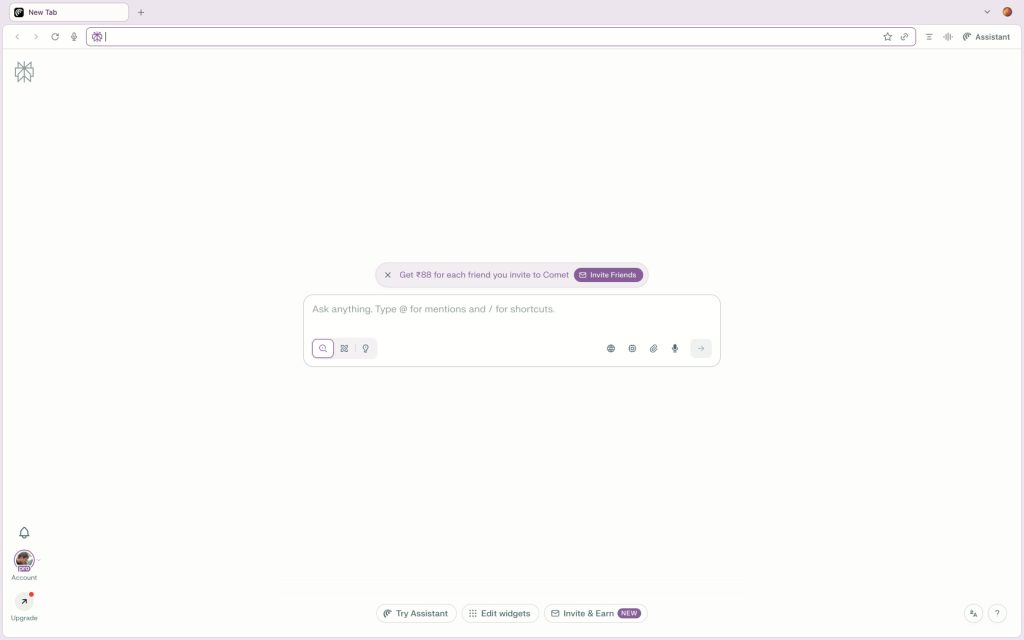
This workspace approach transforms the browser from a viewing tool into a digital project notebook where AI serves as the central organizing intelligence. For users juggling multiple complex projects simultaneously, this context separation proves invaluable. The interface supports multi-tab synthesis, allowing Comet to analyze content across a dozen open pages and surface common themes, contradictions, or patterns. This capability is particularly powerful for qualitative research, competitive intelligence gathering, or any workflow requiring synthesis of diverse sources.
Memory, Context, and Personalization
Both browsers leverage memory to enhance personalization, but they apply it with different intentions. Atlas uses what OpenAI calls Browser Memories, an optional feature that recalls user preferences, browsing habits, and past interactions to make future suggestions and agent actions more tailored. This memory function operates globally across your entire web experience, learning patterns in how you work, shop, and research. The goal is improving ChatGPT’s utility as a generalist assistant that moves with you everywhere online.
Comet offers clearer boundaries around what the AI remembers and when, which some users find more trustworthy and predictable.
Comet’s memory system is deliberately more focused and contextual. Its Persistent Intent Memory operates within the boundaries of defined workspaces, remembering project-specific goals and constraints. This architectural choice reflects Comet’s research-oriented design philosophy. The AI doesn’t need to remember your global preferences as much as it needs to maintain continuity within a specific investigative thread or project.
From a UX perspective, Atlas’s approach reduces repetitive explaining. You don’t need to repeatedly tell the AI your preferences because it learns them over time. Comet’s approach, while more limited in scope, offers clearer boundaries around what the AI remembers and when, which some users find more trustworthy and predictable.
The Cognitive Load Question: A Missing Angle
Most coverage of AI browsers focuses on features and performance metrics, but an underexplored dimension is their impact on cognitive load and mental workflow. Both browsers claim to reduce cognitive friction, but they do so through different mechanisms that suit different cognitive styles.
Atlas reduces extraneous cognitive load by eliminating repetitive tasks and context switching. When the AI can fill forms, summarize pages, or draft responses inline, users can maintain focus on higher-level decision-making rather than mechanical execution. The persistent sidebar means you never have to switch windows or remember to open ChatGPT separately. For users whose cognitive bottleneck is task execution rather than information processing, this design genuinely liberates mental resources.
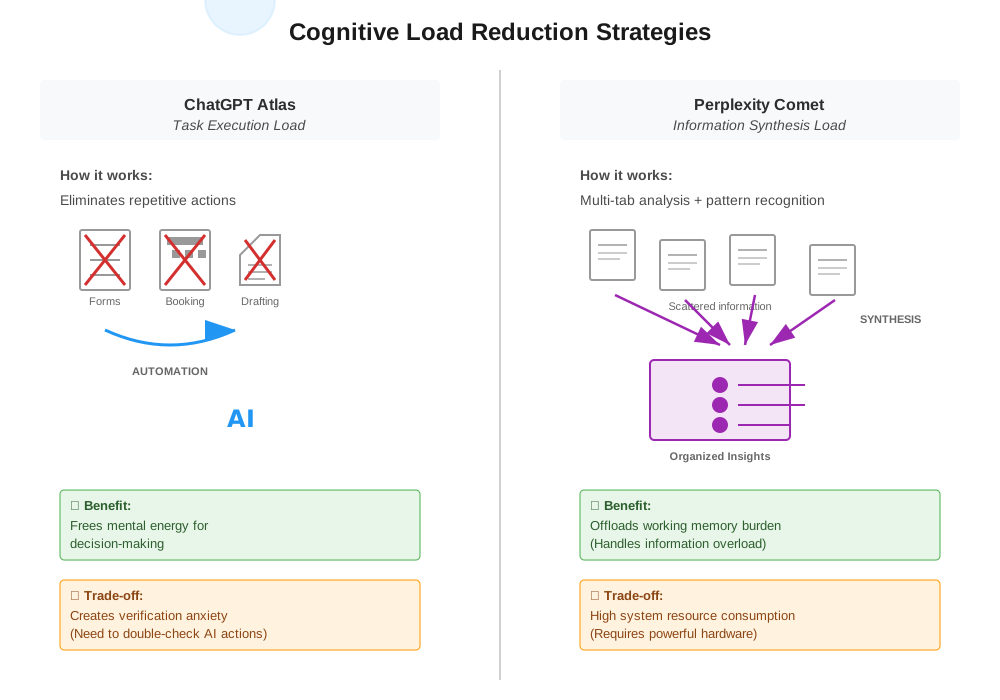
However, Atlas can introduce a different kind of cognitive load: trust and verification burden. When the AI performs autonomous multi-step actions, users must develop mental models of what the agent might do and verify its work. Early reviews note that Agent Mode’s inconsistency means users can’t fully offload tasks without monitoring them, creating a paradoxical situation where automation anxiety replaces execution effort.
Comet addresses a different cognitive challenge: information overload and synthesis paralysis. When researching complex topics across multiple sources, the cognitive load comes from holding disparate pieces of information in working memory while trying to identify patterns and connections. Comet’s multi-tab synthesis and workspace organization offload this cognitive work to the AI, allowing users to focus on interpretation and decision-making rather than information juggling.
The choice between ChatGPT Atlas vs Perplexity Comet depends on where your cognitive bottleneck lies: execution and automation, or synthesis and comprehension.
The workspace model also respects cognitive boundaries between projects. By separating contexts, Comet prevents the interference effects that occur when trying to switch between unrelated research projects. This approach aligns with established principles in cognitive load theory about the limits of working memory and the importance of environmental structure in supporting cognition.
For designers and UX professionals, this cognitive load analysis reveals why neither browser will universally suit all users. The right choice depends on where your cognitive bottleneck lies: execution and automation, or synthesis and comprehension.
Performance, Availability, and Practical Considerations
Platform availability creates immediate practical constraints. ChatGPT Atlas currently runs exclusively on macOS, specifically requiring Apple Silicon Macs, with Windows and mobile versions promised but not yet released. This limitation significantly restricts who can even test the browser, let alone adopt it as a daily driver. For organizations with mixed device ecosystems, Atlas isn’t yet a viable option currently.
On the other hand, Perplexity Comet offers broader platform support, available on Mac, Windows, and Android, with iOS anticipated soon. This cross-platform availability makes Comet accessible to a much wider user base currently, though it comes with its own challenges. Early access is currently limited to Perplexity Max subscribers, a tier that costs $200 monthly for full features, a price point that positions it firmly in enterprise and power-user territory rather than consumer adoption.
Both browsers slow the experience when handling complex tasks or activating AI synthesis or workspace features.
Performance characteristics differ notably between the browsers. Multiple reviews describe Atlas as slower when handling complex tasks, with noticeable battery drain on MacBooks. The Agent Mode, while innovative, frequently lags or fails to complete multi-step operations reliably. Users report instances where automated tasks stall mid-process or produce incorrect results, requiring manual intervention that defeats the automation promise.
Comet faces similar performance challenges but of a different nature. The AI features are resource-intensive, consuming significant CPU and RAM especially when synthesizing across many tabs. Users note that while basic browsing feels fast thanks to the Chromium foundation, activating AI synthesis or workspace features can slow the experience considerably. The high system resource consumption becomes problematic on older machines or when running multiple applications simultaneously.
Privacy, Security, and Trust
Both browsers raise important questions about data privacy and user control. Atlas offers consent-based local privacy controls with optional cloud sync, encrypting local data but still processing extensive browsing information for AI contextualization. OpenAI’s privacy documentation emphasizes user control, but the reality is that meaningful AI assistance requires the browser to observe and analyze your web activity, a trade-off some users find uncomfortable.
Recent security concerns have emerged around Atlas, with some researchers identifying potential vulnerabilities in how the browser handles credentials and sensitive form data during Agent Mode operations. While OpenAI has responded with patches, these issues highlight the novel security challenges that arise when giving AI autonomous web interaction capabilities.
Comet’s aggressive AI features require deep access to browsing history and web app data, with user concerns about data collection for service improvement. Perplexity emphasizes its transparent citation model and fact-checking capabilities, but transparency about information sources doesn’t necessarily equate to transparency about user data handling. For professional environments requiring stringent data governance, particularly in regulated industries, neither browser yet offers enterprise-grade privacy controls or granular user permission systems.
The trust dimension extends beyond technical privacy to functional reliability. Can you trust Atlas to complete a purchase correctly? Can you trust Comet’s synthesis not to miss critical nuances? 💬 (3) These questions of functional trust will likely determine adoption rates more than feature lists.
Use Cases and Ideal Users
The use case alignment for each browser is remarkably clear once you understand their design philosophies. ChatGPT Atlas excels for productivity-focused users embedded in the OpenAI ecosystem who spend significant time on routine web tasks: frequent online shoppers, busy professionals managing digital correspondence, content creators needing quick drafts and edits, and anyone who values workflow automation over research depth. Atlas is particularly powerful for users comfortable with a Mac-centric workflow who want an AI co-pilot reducing repetitive clicks and form filling.
Perplexity Comet targets knowledge workers whose primary online activity is research and analysis: academic researchers requiring verifiable sources, journalists fact-checking across multiple outlets, competitive intelligence analysts synthesizing market data, product managers gathering user insights, and students writing literature reviews. The workspace model and citation transparency make Comet indispensable for anyone whose work product depends on accurate information synthesis and source traceability.
For UX professionals specifically, the choice might depend on project phase. Atlas could accelerate the research and inspiration gathering phase, quickly summarizing design trends or competitive patterns. Comet would better support the deep research phase of understanding user needs, synthesizing interview findings, or analyzing usability research across studies. Having tested both workflows personally, the switching cost between browsers becomes the real friction point, suggesting that most users will eventually commit to one based on their dominant workflow type.
The Broader Implications for Web Interaction
Both browsers signal a fundamental shift in how we conceive of web interaction. The traditional model of browsing as a user-directed, manual activity is giving way to what industry observers call “ambient AI” where intelligent systems observe, anticipate, and act on user intent without explicit prompting. This transition from passive tools to active participants in digital work raises profound questions about agency, skill development, and cognitive partnership.
AI browsers could atrophy important information literacy skills, the ability to critically evaluate sources, synthesize complex arguments, or notice subtle patterns that AI might miss.
Some designers worry that over-reliance on AI browsers could atrophy important information literacy skills, the ability to critically evaluate sources, synthesize complex arguments, or notice subtle patterns that AI might miss. Others argue that by offloading mechanical tasks, these tools free cognitive resources for higher-order thinking and creativity. The reality likely lies somewhere between these extremes, varying by individual and use case.
What’s certain is that the browser, once considered a mature and settled technology category, has become a competitive frontier again. The ChatGPT Atlas vs Perplexity Comet comparison reveals not just different product strategies but competing visions of human-computer collaboration. Will we want computers that do things for us, or computers that help us understand things better? 💬 (1) The answer, as Atlas and Comet suggest, might be both, but for different people and different moments in our work.
What Comes Next
OpenAI faces pressure to expand Atlas beyond macOS, improve Agent Mode reliability, and address security concerns before wider adoption becomes feasible. The company is also exploring deeper integration with other OpenAI products and enhanced memory capabilities that could make Atlas increasingly indispensable for users invested in the ChatGPT ecosystem.
Perplexity needs to refine agentic reliability, reduce system resource consumption, and possibly reconsider pricing strategy to move beyond power users into broader market segments. The company has hinted at deeper workspace collaboration features and API access that could position Comet as infrastructure for knowledge work rather than just a consumer browser.
Neither browser is ready to fully replace Chrome or Safari for most users, but both demonstrate that the era of passive browsing is ending.
The longer-term question is whether these distinct approaches will converge or remain differentiated. Will future AI browsers offer both robust automation and rigorous research synthesis? Or will the philosophical differences prove fundamental, creating distinct market segments for action-oriented versus intelligence-oriented browsers? The answer will shape not just browser competition but the future of how humans and AI collaborate in knowledge work.
Neither browser is ready to fully replace Chrome or Safari for most users, but both demonstrate that the era of passive browsing is ending. The web is becoming conversational, contextual, and agentic.
Whether that future looks more like Atlas or more like Comet might depend less on which company executes better and more on what we discover we actually want from our digital tools once we experience both possibilities.
How are you using AI browsers? Comment and let us know.
Follow our AI Browsers series throughout this month as we unpack the technology, design decisions, ethical questions, and trends defining the next generation of web interaction.






Great analysis on the trust issue. I’ve been testing Atlas for two weeks now and honestly, I don’t trust it to complete purchases yet. For now, I’m using it for research and letting it draft emails, but anything involving money? I’m doing that manually.
Thanks for sharing your real-world testing experience, Michael. The tension between “doing” and “understanding” isn’t binary, it’s contextual. We’re exploring this further in upcoming pieces in our AI Browsers series, including one specifically on the security and reliability challenges facing agentic features. Stay tuned and thanks for stopping by.
The cognitive load section was great. As a UX researcher, I think we’ll need BOTH types of browsers depending on context. When I’m doing competitive analysis, Comet’s synthesis is invaluable and I haven’t caught it missing critical nuances yet though I always cross-check sources. But for repetitive admin work I’d love Atlas-style automation.
Exactly. Context matters more than any feature list. Glad the cognitive load angle resonated with you. Thanks for stopping by and leaving a comment.
I’m cautiously optimistic about both but skeptical of the automation promises. Great read, though!
As we should be! thanks for commenting