

There is a particular kind of tool fatigue that sets in when you have tested too many things that promise to solve design handoff. The pitches all sound structurally similar: draw something visual, get clean code, ship faster, never argue with a developer again. The reality, typically, involves a developer opening your “clean code” file and politely explaining that this is not how any of this works.
So when I set up my account at Subframe and started poking around, I was doing so as someone who has been burned by the genre before. What I found over several sessions of genuine use is not easily summarized as good or bad. It is, more precisely, genuinely right for a specific kind of work and genuinely limited for other kinds. Understanding which side of that line your work falls on is the whole point of this review.
DesignWhine's Verdict
Overall
-
Capability
-
Ease of Use
-
Quality & Reliability
-
Value for Money
Summary
Subframe is the most structurally honest answer currently available to the question of how design and production code stay in sync. It does not solve all problems, and it asks you to accept meaningful constraints. But if your team has been losing weeks to handoff, and you work in React and Tailwind, the tradeoff is worth serious consideration.
Pros
Every component generates real, production-ready React and Tailwind CSS code with no translation step
Unlimited AI generation encourages genuine exploration rather than rationed iteration
Multi-variant AI generation mirrors how design decisions are actually made
Theme system with full token cascade makes brand updates instant across the product
MCP integration with Claude Code, Cursor, and Codex is genuinely forward-thinking
Component library quality is high, with 47 built-in components covering most product UI needs
Templates are production-ready starting points, not decorative mockups
The CLI sync workflow is clean, simple, and does what it promises
Cons
No free-canvas exploration; creative latitude is structurally limited to the component system
Maximum canvas width of 1280px requires code-level handling for wider layouts
Design-to-code relationship is one-directional; codebase changes do not backport to Subframe
AI generation loses context across complex multi-step prompts
Performance degrades on high-component pages
React and Tailwind dependency means it is largely inaccessible to teams on other stacks
What Subframe Actually Is
Subframe sits in an increasingly crowded category of tools that want to collapse the design-to-development gap. What distinguishes it from most competitors is the architectural commitment underneath everything: when you design in Subframe, you are not drawing shapes that will later be translated into code. You are directly manipulating real React and Tailwind CSS components. The visual canvas is a skin over an actual component library. What you see is, structurally, what gets built.
This sounds like a subtle distinction. It is not. It changes what the tool can and cannot do at a foundational level, and it explains nearly all of Subframe’s strengths and all of its frustrations.
The interface is organized around four tabs: Pages, Components, Theme, and Templates. Pages are the screens you build and eventually export as React code. Components are either Subframe’s own built-in library (buttons, alerts, tables, charts, forms, and 40-something others as of my testing) or custom components you create yourself. The Theme section is where you set your brand colors, typography, borders, and corner radii — and crucially, those settings cascade across every component in the system instantly. Templates are pre-built, fully editable starting points for common product screens: dashboards, onboarding flows, settings pages, detail views.


The “Connect to code” workflow, visible prominently in one of the screenshots from my testing sessions, offers direct integration with Claude Code and Cursor as well as a manual CLI setup option. Running npx @subframe/cli@latest sync --all pulls the latest components and theme from your Subframe project directly into your codebase. This is the mechanism that makes Subframe’s promise concrete rather than theoretical.
The Experience of Actually Using It
My first serious test was building a custom component that had been sitting on my to-do list: a mega menu for a hypothetical SaaS product navigation. I described what I wanted to the AI assistant (“hovering mega menu with categorized multi-column dropdown”) and got back a clarifying set of questions about trigger style, content layout, position, and categories before any generation began. This is the correct behavior for an AI design tool. Most tools would have guessed and been wrong.
After specifying hover trigger, full-width dropdown, and multiple columns organized by category, the tool generated a working Mega Menu component with sub-components including Menu Link, Nav Item, and Menu Column. The layers panel on the left showed the full component hierarchy. Default, hover, active, and focused states were all represented in the canvas view. The output was not a mockup of a mega menu. It was a mega menu, with states, ready for code export.
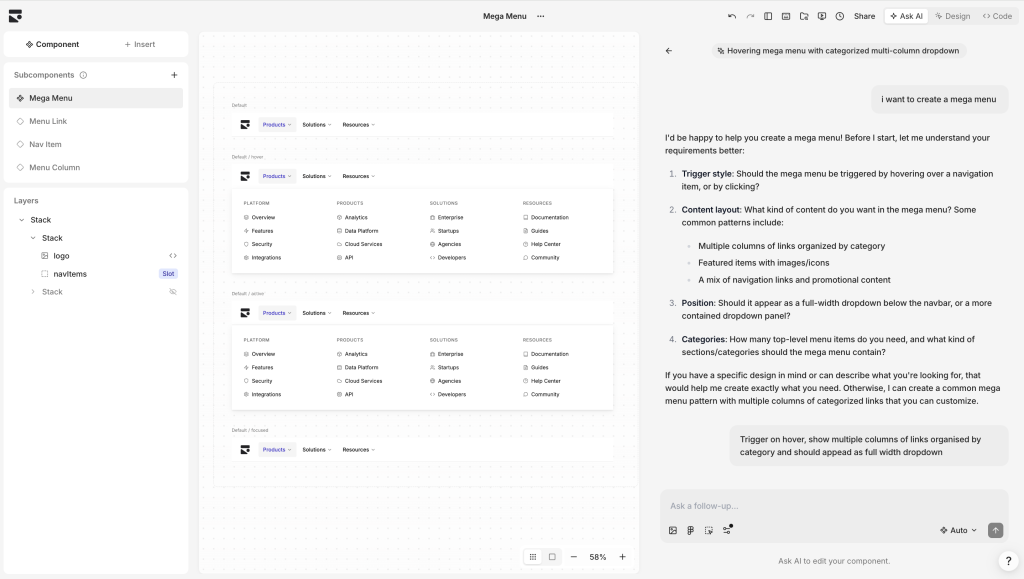
What also struck me about this workflow was the component panel structure. My project in Subframe showed 47 built-in components, from accordions to area charts to a “Chat Channel Message” component, all accessible from the sidebar. This is not a collection of visual assets. These are coded components, and when you place them on a page, you are placing the same structure that a developer would write from scratch.
The Templates section is more useful than I expected. Categories include Dashboard, Detail View, Home, Landing Page, Onboarding, and Settings. These are not generic wireframes. The AI assistant mockup template, for instance, showed a working chat interface that referenced a Subframe project link shared in a channel thread — real product UI, not decorative chrome.

The Theme panel deserves specific mention because it is where the tool’s system-first philosophy is most visible. Editing a color at the Brand 600 level updates every button, badge, and interactive element that references that token across the entire project. Dark mode is included. Typography, border radius, and shadow settings all cascade in the same way. For teams that have spent time building Figma libraries where changing a brand color still requires manual updates across dozens of components, this feels like a genuine step forward.
The AI Layer
The “Ask AI” button in the top navigation of the page editor opens a panel with a simple chat interface labeled “Make changes to this page or ask for a new design.” This is where the generation behavior that distinguishes Subframe from many competitors becomes apparent.
Rather than producing a single output and asking you to accept or reject it, Subframe generates many distinct design variants. You pick the direction you want to develop, then continue refining through follow-up prompts. The AI generates within your defined design system — meaning it uses your components, your theme, your tokens. It does not pull from a generic style library and hope the results approximate your product. This is the constraint that makes it actually useful for production work rather than just impressive in demos.
Rather than producing a single output and asking you to accept or reject it, Subframe generates various distinct design variants. You pick the direction you want to develop, then continue refining through follow-up prompts.
I tested this during a component iteration session. Prompting for responsive breakpoint variants on an existing layout produced multi options, each a plausible interpretation of the brief. None were perfect out of the box. All were better starting points than a blank canvas. The follow-up iteration worked as described, though I noticed that for genuinely complex multi-state components, the AI sometimes struggled to hold context across several prompts and required me to restate constraints I had already established.
The unlimited AI generation is notable. Most tools in this category gate generation behind usage credits, which creates a perverse dynamic where designers ration exploration. Subframe’s approach of making generation open-ended encourages the kind of iterative, divergent behavior that good design actually requires.
Where It Gets Complicated
Here is where I will be direct, because a review that only describes what works is not a review.
Subframe is not a free-canvas design tool. There is no blank slate where you can draw anything in any arrangement and then decide whether to put it in a component. Everything operates within the auto-layout system. Elements live inside stacks. You work with what the component library supports. For a designer who spends significant time in blue-sky exploration — making mood boards, trying unusual layouts, experimenting with brand identity — this constraint is genuinely limiting. The tool sits, as one thoughtful independent review put it, “squarely in the system design logic.” Creativity is not absent, but it is channeled.
This also means the tool works best when you already have a sense of what you are building. If you arrive at Subframe knowing you need a settings page and a dashboard and an onboarding flow, you will move fast and produce something production-ready. If you arrive knowing only that you need to explore what a product could feel like, you will find the environment resistant.
Subframe is not a free-canvas design tool. There is no blank slate where you can draw anything in any arrangement and then decide whether to put it in a component. Everything operates within the auto-layout system.
The canvas has a 1280px maximum width. Layouts beyond that need to be handled in code, either manually or by prompting an AI coding agent post-export. For products with wide-viewport requirements, this is a constraint that surfaces at inopportune moments.
There is also a backporting question that I could not fully resolve during my testing. Once you export code to your codebase and a developer extends a component with custom business logic, there is no clean path to reflect those changes back in Subframe. The design tool and the codebase can drift in the same way that Figma files and production code historically have, just in a different direction. This is not unique to Subframe — it is a fundamental challenge of any tool that bridges design and code — but it is worth flagging for teams that need a truly bidirectional relationship between their design environment and their implementation.
Performance slowed noticeably when working on more complex pages with many components, particularly in the browser. This was not constant, but it was frequent enough to mention as something the team should continue to address.
The MCP Integration: Meaningful or Just Modern?
The “Connect Subframe to AI agents” feature, visible in the Components overview during my testing, allows Claude Code, Cursor, Codex, and Replit to interact directly with your Subframe design system. Your coding agent can pull your design system context, generate new components that respect your tokens and component library, and preview changes before they reach your codebase.

This is genuinely new territory. The conventional relationship between a design tool and a code agent has been one-directional: the agent reads the output of the design tool and tries to implement it. The MCP integration makes Subframe’s design system a live resource that the agent queries and works within. For teams where a significant portion of UI generation is happening through AI coding agents anyway, this closes a real loop.
In practice, I found this more useful conceptually than I could fully evaluate within my testing period. The integration setup was straightforward. Whether the agent’s Subframe-aware output is meaningfully better than its baseline output depends heavily on how well-defined your component library is and how complex the generation task is. For teams with mature design systems in Subframe, this feature likely compounds value. For teams early in their setup, the component library needs to be in good shape before the agent integration pays dividends.
Who This Tool is Actually For
After several weeks of use, the answer to this question is clearer to me than when I started.
Subframe is for product teams building internal tools, SaaS products, and data-heavy applications who work in React and Tailwind, who need their design to stay on-system without manual enforcement, and who want to ship frontend code without a dedicated frontend developer spending days translating every screen from a Figma file.
Subframe is not a competitor to Framer for visual storytelling or to Figma for broad collaborative design work.
It is well suited to small startup teams where the designer and the developer are sometimes the same person, or where the developer does not have the time or inclination to interpret design intent from a mockup. It is also valuable for backend-heavy teams who need to ship product UI quickly without hiring a designer full-time. Multiple users report making this work in early-stage products, and the experiences ring true.
It is less suited to brand-led agencies doing visual exploration, marketing site work, or anything where creative latitude and free-form composition are central to the output. It is not a competitor to Framer for visual storytelling or to Figma for broad collaborative design work. It occupies a specific, narrower lane, and in that lane it is more competent than almost anything else I have tested.