
If you are already a product designer, becoming a design engineer should not mean restarting your career as a junior developer. This guide shows you exactly what to learn, what to ignore, how to build production credibility in 90 days, what one strong transition project should contain, how to use AI without becoming dependent on it, and what evidence hiring teams increasingly expect from a designer who says they can ship.
The important part is the framing. A design engineer is not simply a product designer who has completed a React course. The role exists because some product problems are damaged by the gap between design intent and production reality. The person who can make the interaction decision, understand the system behind it, build the interface, test the awkward states and put it in front of users removes much of that gap.
DesignWhine has already looked at why the design engineer role is emerging. This guide is about the harder question: if you are already a mid-level, senior, staff or lead product designer, how do you become one without wasting a year learning the wrong things?
Table of Contents[Open/Close]
- 1.Define the Job First
- 2.What Employers Keep Asking For
- 3.You Are Not Starting Over
- 4.Know Your Weak Side
- 5.Pick a Design-Engineering Lane
- 6.Do Not Learn Everything
- 7.Use AI, but Keep the Wheel
- 8.The 90-Day Transition Plan
- 9.Build One Serious Transition Project
- 10.Get Production Practice at Work
- 11.Use This Readiness Rubric
- 12.A Note for Design Leaders
- 13.The Career Move in One Sentence
Define the Job First
Do not start with a programming course. Start with the jobs you actually want.
“Design engineer” is still a loose title. At one company it means a designer who owns production UI. At another it is a frontend engineer with unusually strong visual and interaction judgment. At a third it is a design-systems specialist who works in both Figma and code. The title matters less than the boundary of ownership.
Current job descriptions make that boundary much clearer than career advice does. Ashby, the recruiting-software company, expects mid and senior design engineers to be proficient in both design and engineering and to have experience designing products and shipping code to real users. Celigo, an integration and automation platform, explicitly describes its role as neither pure frontend engineering nor pure UX product design, with production-grade TypeScript and React on one side and hierarchy, interaction and usability on the other.
Interaction, the company behind consumer AI product Poke, asks candidates to design in Figma or Paper, prototype in code and ship in Next.js or React while caring about accessibility and performance. Jinba, a YC-backed enterprise workflow automation startup, adds design systems, tokens, component libraries and motion to the mix.
What Employers Keep Asking For
Across current design-engineering roles, five signals repeat often enough to form a useful curriculum:
| Capability | What It Means in Practice | Proof That Counts |
|---|---|---|
| Frontend fundamentals | HTML, CSS, browser behaviour and JavaScript before framework tricks | A responsive interface you can explain line by line |
| React and TypeScript | Components, props, state, events, types and composition | A working product flow, not a tutorial clone |
| Systems thinking | Tokens, variants, reusable components and documented patterns | A coded component system or meaningful contribution to one |
| Production fluency | Git, pull requests, deployment, debugging, APIs and edge states | A repository, commit history and a live URL |
| Interface craft | Responsive behaviour, accessibility, motion, loading and error states | A shipped experience that survives real use |
This is why the common question, “Should product designers learn to code?”, is too broad. We have explored that question separately in Do UX Designers Need to Learn Coding? For this career move, the answer is more specific: you need enough engineering depth to own the interface you are designing, not enough breadth to become the person maintaining distributed infrastructure.
The goal is not to become two full-time specialists at once. It is to become unusually strong at the seam where product decisions become interface code.
You Are Not Starting Over
Experienced product designers already possess several of the skills that are expensive to teach an engineer: interaction judgment, information hierarchy, product context, user behaviour, prioritisation, facilitation, visual restraint and the ability to explain why a solution exists. Those capabilities should remain your advantage.
The mistake is to approach the transition as if those years of experience no longer count. A senior designer who spends twelve months trying to imitate a computer-science curriculum can easily become worse positioned, not better. The market does not need another beginner who knows a little Python, a little React, a little SQL and a few algorithms. It needs people who can use code to extend the design judgment they already have.
Your years in product design are not baggage you carry into engineering. They are the reason this transition can be worth making.
This also changes how you should learn. A developer can practise by solving abstract programming problems. A product designer should practise by turning a design decision into a working interface, then confronting everything the static canvas allowed them to avoid: content overflow, focus management, keyboard behaviour, network delay, validation, permissions, browser differences, responsive states and imperfect data.
Know Your Weak Side
The hardest part for most product designers is rarely writing the first component. AI can already make that deceptively easy. The harder part is developing a mental model of what the browser and application are doing when the generated code stops working.
- Layout: Can you explain why an element is positioned where it is, or are you nudging CSS until it looks right?
- State: Do you understand what changes when a menu opens, a request fails or a form becomes invalid?
- Data: Can you connect a UI to an API response and handle missing, delayed or malformed data?
- Tooling: Can you clone a repository, install dependencies, run the app, create a branch and recover when something breaks?
- Debugging: Can you use the browser console, network panel and source code to locate a problem rather than simply prompting the AI again?
That is the point at which “learning to code” becomes too vague to be useful. The real transition happens when the interface acquires dependencies, data, failure modes and shared ownership. You no longer need to know only what the screen should do. You need to understand enough of what makes it run that you can diagnose a bad state, modify an existing system and keep moving when the happy path breaks.
Pick a Design-Engineering Lane
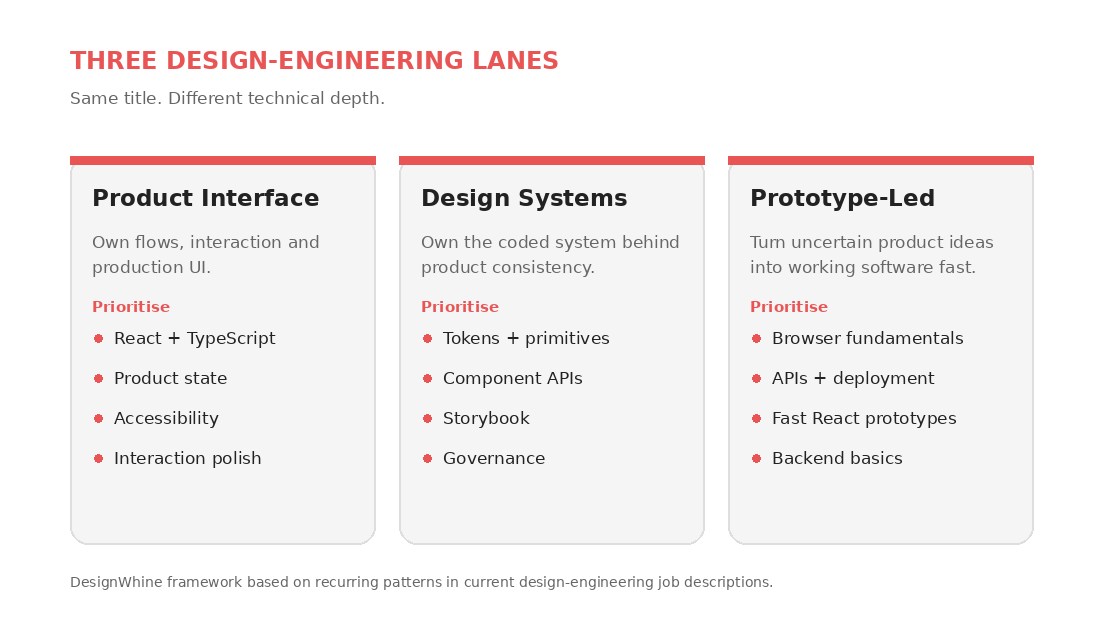
Before you build a learning plan, choose the version of the role you want. Three versions appear often in the market, and they reward slightly different depth.
- Product interface design engineer: Owns flows, prototypes and production UI. Prioritise React, TypeScript, product state, accessibility and interaction polish.
- Design systems engineer: Owns tokens, primitives, component libraries, documentation and adoption. Prioritise CSS architecture, component APIs, Storybook, accessibility and design-system governance.
- Prototype-led design engineer: Turns uncertain ideas into realistic software quickly, often before engineering commits to an approach. Prioritise browser fundamentals, fast React prototyping, APIs, deployment and enough backend literacy to avoid being blocked.
Do not choose based on which title sounds more senior. Choose based on the work you would willingly do every week. Langdock, an enterprise AI platform, has advertised design-engineering work around realistic prototypes and product surfaces. Relevance AI, an AI-agent platform, has design-systems work that goes deeper on tokens, theming, reusable components, accessibility and preventing UI drift.
Do Not Learn Everything
For most product designers moving toward interface-focused design engineering, you do not need to begin with Python, database administration, system-design interviews, native mobile development, advanced algorithms or machine-learning engineering. You may eventually need some of them. They are poor first investments unless the roles you want explicitly ask for them.
Start with the web platform itself. MDN’s learning path is unusually useful because it teaches HTML, CSS, JavaScript, accessibility and browser fundamentals as a connected system rather than isolated tricks. React should come after that foundation, not before it. TypeScript should come after you understand enough JavaScript to know what the types are protecting you from. (Sources: React documentation, TypeScript Handbook.)
The fastest path is not learning more technologies. It is learning the smallest technical surface that lets you own a real product interface.
Use AI, but Keep the Wheel
AI has made this transition faster, but it has also made it easier to fake progress. A product designer can now generate a convincing React interface without understanding its state model, accessibility failures or dependency choices. That is useful for exploration and dangerous as a learning strategy.
The 2025 Stack Overflow Developer Survey found that 84% of respondents were using or planning to use AI tools in development, and 51% of professional developers used them daily. Yet 46% actively distrusted the accuracy of AI output, compared with 33% who trusted it. Stack Overflow also found that the most common frustration, cited by 66%, was AI output that was almost right but not quite.
That is almost a job description for a good design engineer: use the leverage, but retain enough technical and design judgment to recognise the “almost”. This is also why our argument in Why AI Needs a Design System Before It Can Design Anything matters here. Generation becomes much more useful when it operates inside constraints you understand.
AI can remove syntax friction. It cannot remove your responsibility for understanding what ships.
The 90-Day Transition Plan
Here is the practical part. This is a transition plan for an employed product designer, not a full-time student. Aim for roughly six to eight focused hours a week. The rule throughout is simple: every learning block must produce something visible in a browser.
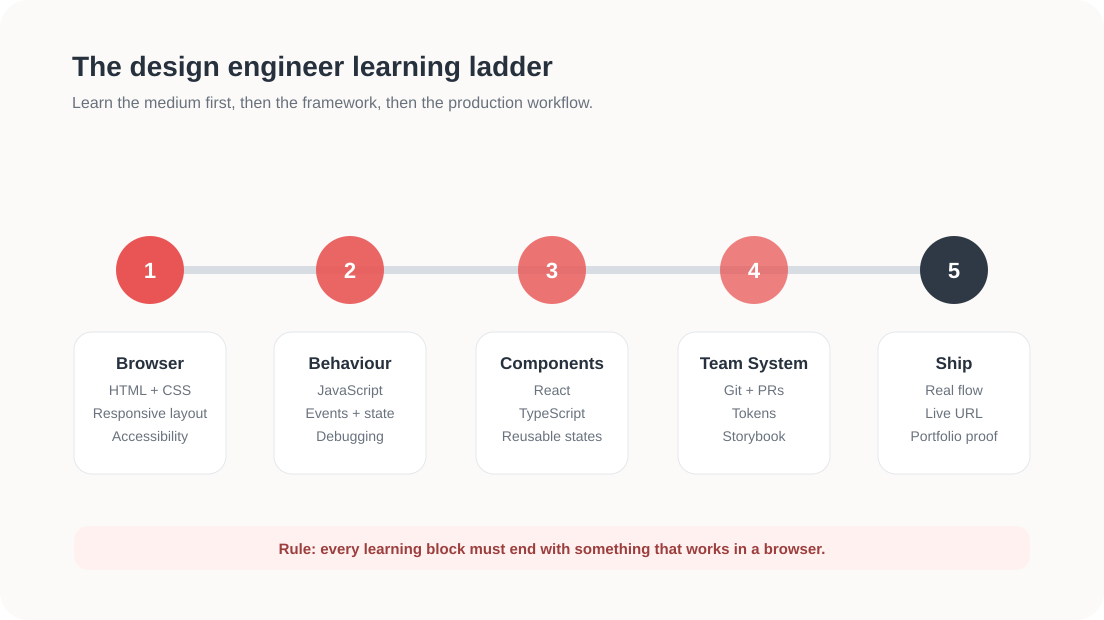
Weeks 1–2: Browser Fundamentals
Rebuild one screen from a product you know using only semantic HTML and CSS. Do not use React. Do not use Tailwind. Do not ask AI to generate the entire page. Choose something with a header, navigation, form controls, a data list and a responsive layout.
- Use Flexbox and Grid intentionally.
- Make it work at desktop, tablet and narrow mobile widths.
- Use proper buttons, labels, headings and landmarks.
- Navigate it using only the keyboard.
- Inspect it using browser developer tools and explain the box model, computed styles and document structure.
Exit test: you should be able to recreate a straightforward Figma screen in the browser without treating CSS as trial and error.
Weeks 3–4: Behaviour and State
Add JavaScript to make the interface behave. Build a dropdown, tabs, a form with validation, a dismissible notification and an asynchronous loading state. The point is not to become clever with syntax. It is to understand events, values, conditions, arrays, objects, functions and state changes.
At this stage, AI is allowed to explain code and review your work. It should not be allowed to write something you cannot describe back in plain English.
Exit test: when the UI behaves incorrectly, you can locate the event or state causing the problem before you ask an AI tool for help.
Weeks 5–6: React and TypeScript
Now rebuild the same interface in React. Turn repeated UI into components. Pass data with props. Manage local state. Render lists. Handle events. Add TypeScript and learn everyday types, object shapes, unions and component props before worrying about advanced generic types.
This sequence matters. If you learn React before you understand the browser, every problem feels like a React problem. If you understand HTML, CSS and JavaScript first, React becomes what it actually is: a way to organise interface logic and composition.
Exit test: you can take a Figma component with variants and model it as a reusable React component without creating a different component for every visual state.
Weeks 7–8: Work Like a Team
Move the project to GitHub. Learn branches, commits, pull requests and basic conflict resolution. GitHub Skills has interactive beginner material for Git and GitHub workflows. Then add Storybook or an equivalent component workbench and document several component states.
- Create a branch for one UI improvement.
- Commit in small, understandable steps.
- Open a pull request, even if you are reviewing it yourself.
- Document default, hover, focus, disabled, loading, error and empty states where relevant.
- Ask an engineer you trust to review the pull request as engineering work, not as a design favour.
Exit test: you can hand another engineer a repository they understand without sitting beside them and explaining how it works.
Weeks 9–10: Ship a Real Flow
Stop building isolated components. Build one complete product workflow. Good candidates include account onboarding, team invitations, notification settings, checkout, a searchable data table or a permissions flow. Avoid a marketing landing page unless the roles you want are specifically web-and-brand focused. Product design engineers need to prove state, logic and edge-case thinking.
Your flow should include realistic data, loading, empty, success, error and validation states. It should work at multiple viewport sizes, support keyboard use and connect to at least one real or mock API. Deploy it publicly. The production URL is part of the work.
This is where the ideas in How AI Is Changing the Journey from PRD to UI become practical. The valuable shift is not that AI can produce the first screen. It is that one person can stay with the problem farther into implementation, where important design decisions often appear.
Exit test: somebody can use the flow without you, break it in at least one way you did not expect, and you can diagnose and fix the problem.
If all your portfolio proves is that you can render the happy path, you have proved design output. Design engineering begins with what happens when reality interferes.
Weeks 11–12: Package the Evidence
Do not present the project like a conventional product-design case study with forty slides of process. A design-engineering portfolio needs harder evidence.
- Live product: a URL people can use.
- Repository: code, commits and project structure.
- Short walkthrough: 60 to 90 seconds showing the interaction and edge states.
- Design decisions: three to five decisions where implementation changed or improved the original design.
- System decisions: how tokens, components and variants are organised.
- Quality proof: what you did for accessibility, responsiveness, performance and error handling.
- AI disclosure: what AI generated, what you changed and one example where you rejected or corrected its output.
That last point is increasingly important. Hiding AI assistance is less impressive than demonstrating that you can supervise it. A senior design engineer is valuable because they can tell the difference between fast code and good code.
Your portfolio should prove that the handoff ended because you could carry the work farther, not because you discovered a new title for the same Figma output.
Build One Serious Transition Project
If you only have time for one side project, make it deliberately boring and technically revealing. A sophisticated settings or account-management workflow is often better proof than a cinematic AI concept because it forces you to solve product states that real teams live with every day.
A strong brief would look like this: design and build a team-management area for a fictional B2B product. Users can invite members, assign roles, search the member list, revoke access and handle a failed invitation. The interface needs responsive behaviour, keyboard navigation, loading and empty states, permission differences between admin and member roles, form validation, optimistic feedback and a reusable component pattern for status messages.
Why this works: it tests the exact seam between design and engineering. The visual design is not difficult enough to hide behind. The challenge is in states, rules, system consistency, implementation and polish.
Get Production Practice at Work
The fastest path for an experienced designer may not be a side project at all. If you already work inside a product team, you have something a bootcamp cannot give you: a real codebase, real constraints and engineers who know where the interface debt lives.
- Ask to pair on one low-risk frontend bug that affects a component you designed.
- Take ownership of a neglected empty, loading or error state and implement the fix with an engineer reviewing your pull request.
- Contribute one design-token or component change to the design system.
- Prototype a difficult interaction in code before the team commits to a solution.
- Volunteer to fix one accessibility issue in the production UI.
The goal is not to quietly become an unpaid frontend developer. Set the scope with your manager and engineering partner. You are trying to build interface ownership and production fluency, not absorb a second full-time job.
Use This Readiness Rubric
Before changing your LinkedIn headline, score yourself against the work:
- I can build a responsive product screen from a blank repository.
- I can explain the HTML, CSS and JavaScript beneath my framework.
- I can build reusable React components with meaningful TypeScript types.
- I can model loading, empty, error, success and validation states.
- I can use Git branches, commits and pull requests without treating them as magic.
- I can connect a UI to an API or realistic data source.
- I can debug AI-generated code instead of regenerating it blindly.
- I can defend the accessibility and responsive behaviour of what I shipped.
- I have at least one live interface and repository that prove these claims.
- I can explain where my design judgment changed the implementation, and where engineering reality changed the design.
If you can credibly answer yes to seven or more, you are probably ready to apply to product-facing design engineer roles and let individual job descriptions expose the remaining gaps. If you are below five, keep building rather than collecting more certificates. The missing signal is likely practice.
A Note for Design Leaders
For heads of design and product leaders, there is a warning inside this career trend. Do not turn “design engineer” into a convenient way to ask every product designer to do two jobs. The strongest current roles are explicit about ownership: production UI, systems, prototyping, interaction craft and the technical boundary between design and engineering.
If your organisation wants this capability, define where production code ownership begins and ends, who reviews it, how design engineers are levelled, and whether they sit in design, engineering or a genuinely shared model. Otherwise the role becomes a vague expectation that designers should “know more code” while engineers remain the only people trusted to ship. That creates extra labour without removing the handoff.
A design engineer without production ownership is often just a product designer carrying a larger workload.
The wider shift is real. As we argued in The Gates of Design Have Fallen, AI is already making the boundaries around who can design, prototype and build more porous. But porous roles only create leverage when organisations change ownership with them.
The Career Move in One Sentence
Do not try to become a software engineer who happens to have a design background. Become the product designer who can carry a high-quality interface from decision to production, understand what the code is doing, fix it when the tools get it wrong, and leave the product system stronger than you found it.
That is a much narrower learning goal. It is also a much more valuable one.





For designers who have made this move already: what was the first production task that made you feel less like a designer learning code and more like someone genuinely working across both sides?