
AI lowers the cost of producing design artifacts. It does not lower the cost of product judgment. That is the premise behind the DesignWhine Judgment Gradient: delegate more when work is reversible, high-volume and easy to verify; increase human authority as decisions become consequential, ambiguous or expensive to undo.
That distinction is becoming more useful than any fixed list of AI tools. Senior product designers are dealing with much more practical questions now: Should I still start in Figma? When should I use Claude Code, Cursor or Codex? Where does MCP fit? Can AI synthesize research safely? When is a coded prototype better than a Figma prototype? And if an agent can make a pull request, what exactly is the designer still responsible for?
This guide answers those questions with one operating model. It builds on DesignWhine’s earlier coverage rather than repeating it. We have already explained how AI is compressing the journey from PRD to UI, how to make a design system AI-ready, why design tokens are becoming an API between design and code, and how an AI-native UX team can work without hollowing out the practice. What has been missing is the day-to-day operating model that connects those pieces.
The workflow below is therefore not a software stack. It is a map of decision rights. AI changes role at every stage, from challenger to compressor to builder to inspector. The senior designer’s job is to know when to take leverage from the machine and when to take authority back.
Table of Contents[Open/Close]
- 1.AI Workflow for Product Designers: The Short Answer
- 2.The Workflow Map
- 3.Stage 1: Frame the Problem
- 4.Stage 2: Ground in Evidence
- 5.Stage 3: Explore Directions
- 6.Stage 4: Structure the Experience
- 7.Stage 5: Materialize It
- 8.Stage 6: Evaluate What Exists
- 9.Stage 7: Ship Through the System
- 10.Stage 8: Learn From Reality
- 11.Which AI Tools Should Product Designers Use?
- 12.Frequently Asked Questions
AI Workflow for Product Designers: The Short Answer
If you want a usable AI product design workflow without reading another manifesto, use this sequence:
- Frame: define the decision, user problem, constraints and unknowns. Output: decision brief.
- Ground: organize research, analytics, support evidence and product context. Output: evidence ledger.
- Explore: generate multiple credible directions, not one polished answer. Output: three meaningfully different directions.
- Structure: resolve flows, information architecture, states and edge cases. Output: state + edge-case map.
- Materialize: turn the strongest direction into a realistic prototype in Figma, code, or both. Output: behavior-valid prototype.
- Evaluate: inspect usability, accessibility, system fidelity and evidence from real users. Output: prioritized failure log.
- Ship: translate approved intent into production and review what actually changed. Output: reviewable implementation diff.
- Learn: use behavioral data and qualitative feedback to decide what the next problem is. Output: next-decision brief.
The important part is not the eight stages. It is the change in AI’s job as the work progresses. AI should not remain a generic chatbot throughout the project. Its role should move from challenger → compressor → diverger → stress-tester → builder → inspector → translator → monitor.
The senior designer’s advantage is not knowing more AI tools. It is knowing what kind of work can be delegated at each stage without delegating the decision itself.
The DesignWhine AI Workflow Map
This is the core framework. It is designed around decision rights, not software brands. Read it from left to right as a Judgment Gradient: early work can tolerate more machine leverage because it is easier to challenge and redo; later decisions require progressively more human judgment because they affect product behavior, users, implementation and release risk.
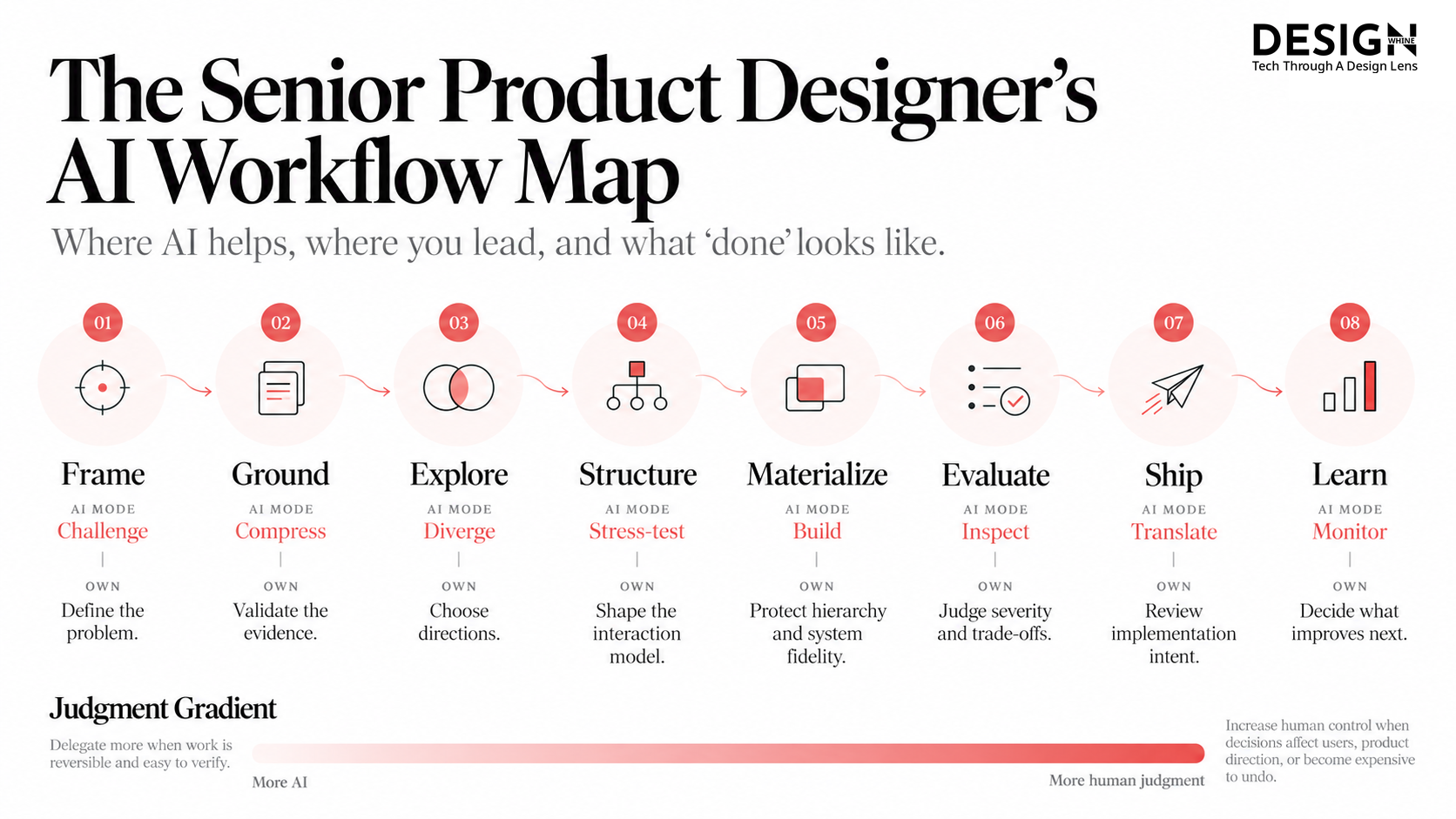
The workflow map is intentionally not a list of “best AI tools for designers.” A senior workflow should survive the disappearance of any one tool. Figma, Claude, Cursor, Codex and whatever arrives next are surfaces. The durable skill is assigning the right kind of work to the right surface.
Stage 1: Frame the Problem
Use AI to challenge the brief, not to write the brief and quietly turn it into truth. Give it the request, known constraints, previous research, relevant metrics and stakeholder claims. Ask it to identify assumptions, contradictions, missing evidence and alternative interpretations of the problem.
A useful output is not a polished PRD. It is a short decision brief: who is struggling, what behavior or outcome needs to change, what constraints are real, what we know, what we are assuming, and what decision this work needs to support. If the team cannot summarize that on one page, it is not ready to explore solutions.
This extends the argument in our piece on the AI-compressed journey from PRD to UI. AI can reduce translation cost before a canvas opens. It should not erase the moment where somebody decides what problem is worth solving.
Stage 2: Ground in Evidence
This is where general-purpose models are genuinely useful. Feed them interview transcripts, support themes, product analytics summaries, usability findings, prior decisions and domain documentation. Ask for clustering, contradiction detection, evidence tables and unanswered questions.
But keep one rule: AI may summarize evidence; it may not silently become evidence. The output here should be an evidence ledger: the important claims, the source behind each one, contradictions between sources, and anything that remains inference rather than observed fact.
The distinction matters even more in AI-assisted research. DesignWhine’s comparison of synthetic users and real users reached a similar conclusion: simulated feedback can help generate hypotheses and expose possibilities, but it cannot replace observed human behavior when the decision depends on how real people actually respond.
Stage 3: Explore Directions
The output here should be an evidence ledger: the important claims, the source behind each one, contradictions between sources, and anything that remains inference rather than observed fact.
AI is strongest here when you ask it to widen the solution space rather than produce a final screen. Ask for different information architectures, different interaction models, alternative sequencing, aggressive simplification, or a deliberately conservative system-native option.
References matter more than adjectives. “Make it cleaner” or “make it premium” gives a model almost no durable product context. Concrete references, existing interaction patterns, approved components, real content and explicit constraints give it something much closer to design intent. This applies beyond visual styling: if you want the model to reason like part of the product team, give it the same evidence, system language and examples the team itself uses.
AI should help the team generate alternatives faster than it can become attached to the first plausible one.
The senior designer’s job is selection. Do not reward novelty. The output should be three meaningfully different directions, each with a rationale and a reason it might fail. If AI gives you three cosmetic variations of the same idea, exploration has not happened.
Stage 4: Structure the Experience
Before polishing UI, use AI as an adversarial reviewer of the flow. Give it the intended journey and ask it to enumerate empty states, partial states, permission failures, loading, destructive actions, undo, interruptions, data extremes, accessibility concerns and transitions between roles.
This is where a lot of impressive AI-generated work falls apart. A generated dashboard can look plausible while the underlying product model is unresolved. The output should be a state + edge-case map that covers the important transitions, failure states, permissions, interruptions and recovery paths before visual polish hides those gaps.
Stage 5: Materialize It
This is the stage where the “Figma or code?” question finally becomes useful. The output is a behavior-valid prototype: something realistic enough to reveal interaction truth rather than merely communicate visual intent.
- Stay in Figma when the main uncertainty is hierarchy, visual comparison, collaborative critique, component composition or rapid manipulation of many interface alternatives.
- Move into code when the uncertainty is behavior: real data, complex interaction, responsiveness, transitions, keyboard behavior, state management or anything that becomes artificial inside a static prototype.
- Use both when the team has an established design system and needs round-trip continuity between canvas and production.
Figma’s MCP server now exposes structured design context such as components, variables and layout information to coding agents, and its current write capabilities can also create or update native Figma content. Code Connect can map design components to production components. That makes the useful model increasingly circular rather than a one-way handoff. (Sources: Figma MCP documentation; Figma’s MCP guide for designers.)
Do not turn this article into your design-system setup guide. We already have one. If your agent invents components, ignores tokens or produces code that only resembles the real system, use our AI-ready design-system checklist before blaming the model.
Do not choose Figma or code by ideology. Choose the representation that makes the current uncertainty hardest to fake.
Stage 6: Evaluate What Exists
AI is excellent at increasing review coverage. Ask it to compare implementation with the design system, inspect copy consistency, enumerate accessibility risks, generate test cases, check for missing responsive states and identify places where the production UI has drifted from the intended component model.
But evaluation is not just bug finding. For AI products in particular, conventional task completion can hide deeper failures around trust, unpredictability and recovery. Our guide to evaluating AI products goes deeper into that problem. The output here should be a prioritized failure log: what failed, severity, evidence, affected users, and whether the failure blocks release or can be accepted deliberately.
Stage 7: Ship Through the System
Once intent is approved, repo-aware agents become far more valuable than generic chat. Claude Code, Cursor and Codex can operate against actual project context rather than a screenshot of it. Persistent project instructions also matter: Cursor, for example, documents project rules as version-controlled context for agent behavior, while Codex supports reusable Skills for team standards and workflows. (Sources: Cursor Rules; OpenAI Codex.)
For a senior designer, this can mean reviewing a branch, making a contained UI fix, asking an agent to replace hardcoded values with system tokens, verifying component usage, or preparing a pull request for engineering review. The useful output is a reviewable implementation diff: a change small and legible enough for design and engineering to inspect against the agreed experience. It does not mean the designer needs to become the production owner of every line of front-end code.
If you want to go further into that boundary, our guide on becoming a design engineer when you are already a product designer treats coding as a deliberate career expansion. This workflow does not assume every senior designer wants or needs that role.
Stage 8: Learn From Reality
After launch, use AI for the boring but valuable aggregation work: group support tickets, summarize recurring friction, compare qualitative themes with analytics, surface anomalies, and prepare a compact evidence pack for the next review.
The human job is to resist dashboard theater. A metric moving does not automatically tell you why it moved or whether the experience improved. The output should be a next-decision brief: what changed, what remains uncertain, what evidence matters now, and which problem deserves another cycle. That closes the loop back to Stage 1.
Which AI Tools Should Product Designers Use?
Choose the tool based on where the uncertainty lives, not which product currently has the most impressive demo.
If the Uncertainty Lives in Documents or Reasoning: ChatGPT or Claude
Use a strong general-purpose model when the work is primarily research synthesis, brief interrogation, critique, option generation, planning or reasoning across documents. The model is useful because it can compress context and challenge assumptions quickly. It is not useful because it somehow knows which product decision is correct.
If the Uncertainty Lives in Visual Composition or System Intent: Figma
Use Figma when the question is hierarchy, visual comparison, component composition, critique or how an interface should express the design system. A shared canvas still matters when people need to see competing possibilities at once and discuss intent before implementation hardens the answer.
If the Uncertainty Lives in Behavior or the Repository: Claude Code, Cursor or Codex
Use a coding agent when the real question lives in the product itself: responsive behavior, state management, real data, production components, accessibility implementation, design QA or a UI change that has to survive the repo. Once the uncertainty becomes executable, screenshots and static mockups become weaker representations of the problem.
If the Uncertainty Is Context Continuity Between Systems: MCP
MCP is useful when the failure is not ideation or implementation but context loss between tools. Figma’s MCP server can expose structured design context such as components, variables and layout information to supported agents, reducing the need to reconstruct design intent from screenshots. Anthropic describes MCP more generally as an open protocol for connecting models to tools and data sources. (Figma MCP documentation; Anthropic MCP documentation.)
The DesignWhine Judgment Gradient
The Judgment Gradient is the rule underneath the entire workflow. AI leverage should rise when work is reversible and easy to verify. Human judgment should rise when a decision affects users, product direction, trust, accessibility or anything expensive to undo. Before delegating a design task to AI, ask one question:
If this output is wrong, how quickly will a competent human notice, and how expensive will it be to undo?
If the answer is “immediately and cheaply,” delegate aggressively. Generate alternatives. Rewrite copy. Enumerate edge cases. Build a throwaway prototype. Audit token usage. This is the left side of the Judgment Gradient: more AI leverage.
If the answer is “maybe not until users are affected,” increase human control. Research interpretation, permission models, destructive flows, accessibility trade-offs, product direction and release decisions deserve more than a plausible-looking generated answer. This is the right side of the Gradient: more human judgment.
This is also why the future senior designer is unlikely to be defined by prompt fluency. Prompting becomes ordinary. The differentiator is still judgment: understanding the product deeply enough to know where speed is useful, where fidelity matters, where evidence is missing and where the AI has produced something convincing enough to stop the team thinking.
Frequently Asked Questions
These are the practical questions senior product designers are most likely to run into when building an AI-assisted workflow across research, Figma, coding agents and production.
What is the best AI workflow for product designers?
A practical AI product design workflow moves through eight stages: frame the problem, ground the work in evidence, explore alternatives, structure flows and states, materialize a realistic prototype, evaluate it, ship through the real product system, and learn from production. AI should play a different role at each stage rather than act as one generic design assistant.
Should product designers learn Claude Code, Cursor or another coding agent?
It is worth learning a coding agent when interactive prototypes, production UI, component libraries or design-to-development friction are important in your role. You do not need to become a software engineer first, but you do need enough technical literacy to review what the agent changes and collaborate safely with engineering.
Is Figma still necessary for product designers in 2026?
For many teams, yes, but not for every stage. Figma remains strong for collaborative exploration, visual comparison, design systems and critique. Code-based prototyping becomes more useful when the important uncertainty is behavior, real data or implementation. Mature workflows increasingly move between the two.
What does Figma MCP do for designers?
Figma MCP gives supported AI agents access to structured Figma context such as components, variables and layout data. With the right setup, it reduces the need to explain a design through screenshots and helps design and code stay closer to the same system.
When should a product designer move from Figma into code?
Move into code when the main uncertainty is behavior rather than appearance: real data, complex interaction, responsiveness, state management, keyboard behavior, transitions or anything that becomes artificial inside a static prototype. Stay in Figma when comparison, critique, composition and design-system work are still the dominant questions.
What should product designers never delegate completely to AI?
Do not fully delegate problem selection, interpretation of weak or ambiguous evidence, consequential product trade-offs, accessibility responsibility, user trust decisions or final release accountability. AI can contribute to each task, but the decision needs an accountable human owner.
The DesignWhine View
The most useful question for a senior product designer is no longer “Which AI tool should I learn?” That question expires every few months.
The durable question is: where in the product-design lifecycle can I trade manual effort for machine leverage without trading away judgment?
That is why the workflow above begins before Figma, passes through code when behavior demands it, and returns to human evidence after the prototype works. AI is not one new step in the old design process. It changes the cost of producing artifacts throughout the process. Senior design becomes the discipline of deciding which artifacts deserve to exist, which decisions deserve evidence, and which shortcuts are safe.
AI makes artifacts cheaper. Judgment stays expensive. The tools will keep moving. The decision rights should not.



Where has AI become genuinely indispensable in your product-design workflow, and where does it still create more cleanup, ambiguity or design debt than leverage?