


If your design system already works for designers and developers, making it AI-ready should not mean rebuilding it for a third audience. This guide shows you how to audit what you have, make Figma machine-readable, connect design components to production code, expose that context through MCP, constrain Claude or another coding agent with rules, validate generated UI, and decide whether your system is genuinely ready for agentic design-to-code work.
The distinction matters because “AI-ready” is rapidly becoming another vague maturity label. Teams install an MCP server, point an agent at Figma and expect the design system to become intelligent. But MCP does not repair bad naming, duplicated components, raw colour values, unclear variants or a gap between the component in Figma and the one developers actually ship. It simply gives the agent better access to whatever system already exists.
If you need the broader architecture before adding the AI layer, our DesignWhine Guide to Design Systems explains how foundations, tokens, components, code, documentation and governance fit together as shared product infrastructure.
DesignWhine has argued before that AI needs a design system before it can design coherently. The important change now is that this is no longer only an editorial argument. Figma’s own guidance for AI workflows says agents understand systems better when components and layers have meaningful names, layouts communicate structure, component properties define possible states, and variables replace raw visual values. Code Connect can then give the agent references to the production components behind those designs. (Sources: Figma AI design-system guidance; Figma Code Connect documentation.)
Table of Contents[Open/Close]
What AI-Ready Actually Means
A normal design system is built to answer human questions. Which button do I use? What spacing token applies here? Does this modal have a destructive variant? How should this component behave on mobile?
An AI-ready design system has to answer the same questions in a form software can discover and interpret. The component called “Button” needs explicit properties instead of a pile of visually similar instances. The colour behind a surface should resolve to a semantic token rather than an arbitrary hex value. The Figma component needs a reliable relationship to the component developers import in production. The agent needs rules that explain which parts of the codebase are canonical and what it must not invent.
An AI-ready design system is not a library that an agent can see. It is a system whose decisions an agent can reliably identify, reuse and verify.
This shifts the unit of maturity. A beautifully organised Figma library can still be machine-opaque if the semantics live in people’s heads. Conversely, a relatively modest component set can be highly usable by an agent if names, properties, tokens, code mappings and constraints are explicit.
The best mental model is a contract. Figma describes the product’s design intent. The production library describes what can actually be shipped. The AI agent is allowed to operate across the two, but only inside the contract they share.
Why Most Systems Fail AI
Most design systems were never structured for machine interpretation. They were structured for team convenience. A designer could understand that “Card 04 final” was the new one because everyone on the team knew the history. An engineer could tell that the blue value in Figma corresponded to --color-action-primary because the mapping was tribal knowledge. A lead designer knew that a disabled button was represented by opacity only in one legacy flow and should not be copied elsewhere.
Humans are remarkably good at compensating for that ambiguity. Agents are remarkably good at reproducing it at scale.
If the semantics live in people’s heads, the agent will guess. AI-readiness begins by turning tribal knowledge into structure.
Figma now explicitly recommends meaningful layer and component names because its agent reads those names as structural signals. It also recommends defining component properties and variants because they tell the agent what a component is capable of, rather than forcing it to infer possibilities from visual inspection. Variables do the same for colour, spacing and typography by replacing raw values with named decisions. (Source: Figma, Best practices to help AI understand your design system.)
This is also why screenshot-to-code can look impressive while still being wrong. A screenshot can show that a button is blue and 40 pixels tall. It cannot tell an agent that the button should be imported from src/components/Button, that the colour is a semantic action token, that the component supports a loading state, or that its accessible name must come from visible text. Structured context can.
Figma itself makes this distinction in its MCP documentation: the server provides design context, but it does not magically understand your design system or generate final production code by itself. Code Connect, variables and clear prompts are what make the context more specific to your product. (Source: Figma, What the MCP sends vs. what the agent does.)
The New Design-to-Code Stack
The old handoff stack was relatively linear: Figma file, specification, developer interpretation, production code. The emerging stack is more circular and has at least five layers.
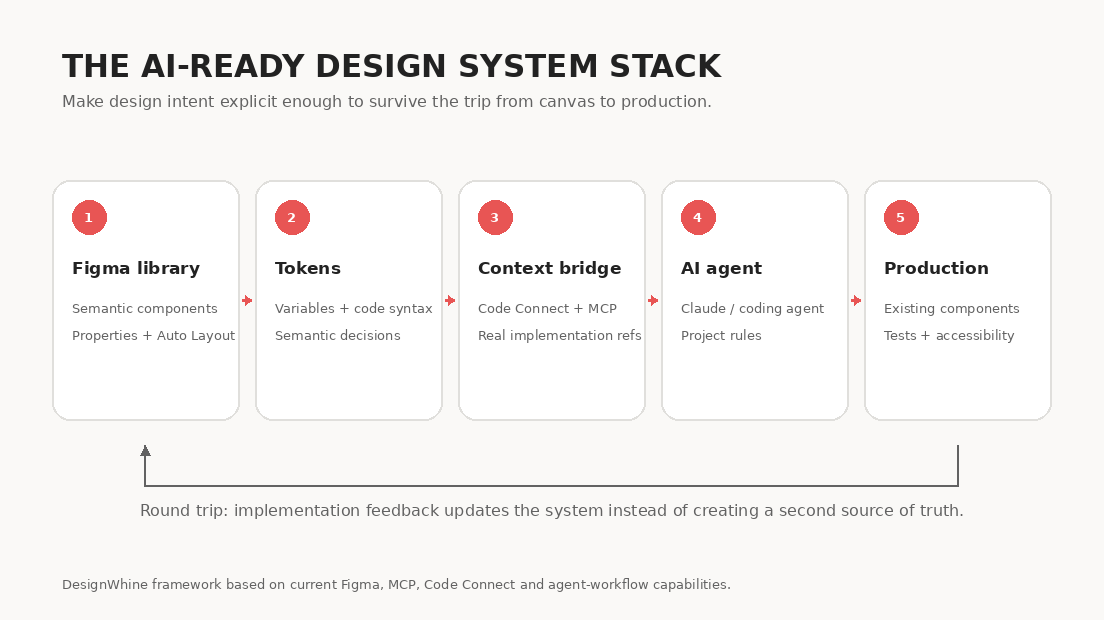
| Layer | What It Holds | Why the Agent Needs It |
|---|---|---|
| Figma library | Components, variants, Auto Layout, variables, states | Structured design intent |
| Design tokens | Semantic colour, type, spacing, radius, modes | Named decisions instead of raw values |
| Production component library | React, SwiftUI, Compose or other real components | What the product can actually ship |
| Code Connect + MCP | Mappings and structured context | Connects Figma objects to real implementation detail |
| Agent rules + validation | Project instructions, tests, accessibility and review rules | Constrains what the agent may create or change |
The important addition is that the design system can now travel in both directions. Figma’s current MCP server can expose structured context such as components, layout, variables and code mappings to supported coding agents, and its newer write capabilities can create or modify native Figma content from an agent. Figma describes this as a continuous workflow between code and canvas rather than a one-way export. (Sources: Figma MCP documentation; Figma code-to-canvas workflow.)
That circularity is the real change. As we explored in How AI Is Changing the Journey from PRD to UI, generation is becoming less interesting than continuity. If a prototype becomes disconnected from the system the moment it leaves the canvas, the team still pays the old translation cost.
The new handoff is not Figma to code. It is a loop in which design intent and production truth keep correcting each other.
Audit Before You Connect
Do not begin by installing an MCP server. Run a small system audit first. Pick ten components that appear frequently in production and compare their Figma representation with their coded implementation.
- Name: Is the same concept called the same thing in Figma, documentation and code?
- Properties: Do Figma variants and component properties map cleanly to actual props or states?
- Tokens: Are colour, spacing, type and radius expressed through variables or tokens rather than raw values?
- Structure: Does Auto Layout communicate the responsive logic developers are expected to implement?
- Code: Is there one canonical production component, or several competing versions?
- Documentation: Are constraints, accessibility expectations and prohibited uses written down?
- Parity: Does the Figma component still represent what is currently shipped?
If several of these answers are “no”, connecting an agent will mostly make the inconsistency faster. This is a useful moment to revisit our earlier piece on why design systems fail: governance debt does not disappear when the interface to the system becomes conversational.
MCP is an access layer. It can expose your system to an agent, but it cannot decide which version of your system deserves to be trusted.
The AI-Ready Build Plan
This is the implementation sequence we would use for an existing product team. Do not attempt to “AI-enable” the whole library in one migration. Start with the components and product surfaces that are used most often, then expand once the workflow proves itself.
Step 1: Fix the Semantics
Rename components, layers and properties so they describe purpose rather than appearance or history. Figma’s AI guidance gives a simple example: Card/Product/Default gives an agent useful structure, while Frame 42 copy does not. The same principle applies deeper in the component tree. PriceLabel, LeadingIcon and ErrorMessage carry meaning that Text 7 and Group 3 cannot.
- Use one naming convention across component families.
- Name what something is, not what it currently looks like.
- Use consistent property names such as
size,state,intentandemphasis. - Remove “final”, “new”, “v2” and similar historical language from canonical components.
- Give important nested layers semantic names when their role matters to implementation.
Exit test: an engineer unfamiliar with the library should be able to predict what a component is and what it can do from its name and properties alone.
Step 2: Make Behaviour Explicit
Turn hidden conventions into component properties, variants and layout structure. Figma describes component properties as structured signals that tell an agent the available sizes, states, boolean toggles and flexible slots. This matters because a model should not have to infer every legal state by inspecting a collection of visually similar frames. (Source: Figma component properties.)
- Model states such as default, hover, focus, disabled, loading and error where they genuinely belong to the component.
- Use boolean properties for optional elements rather than duplicating whole components.
- Use instance swaps or slots for controlled composition.
- Use Auto Layout so hierarchy, spacing and responsive behaviour are visible as structure.
- Document invalid combinations so the agent does not treat every property permutation as acceptable.
Exit test: the component’s legal behaviour can be described from its structured properties without opening a separate explanation deck.
Step 3: Turn Values Into Tokens
Replace arbitrary values with semantic variables wherever the system already has a reusable decision. Figma variables can represent design tokens and modes, and can also carry code syntax for Web, Android and iOS. The important word is semantic. blue-500 describes a value; color/action/primary describes a decision. Our deeper guide to design tokens as the API of design explains why those names increasingly behave like contracts across tools and code.
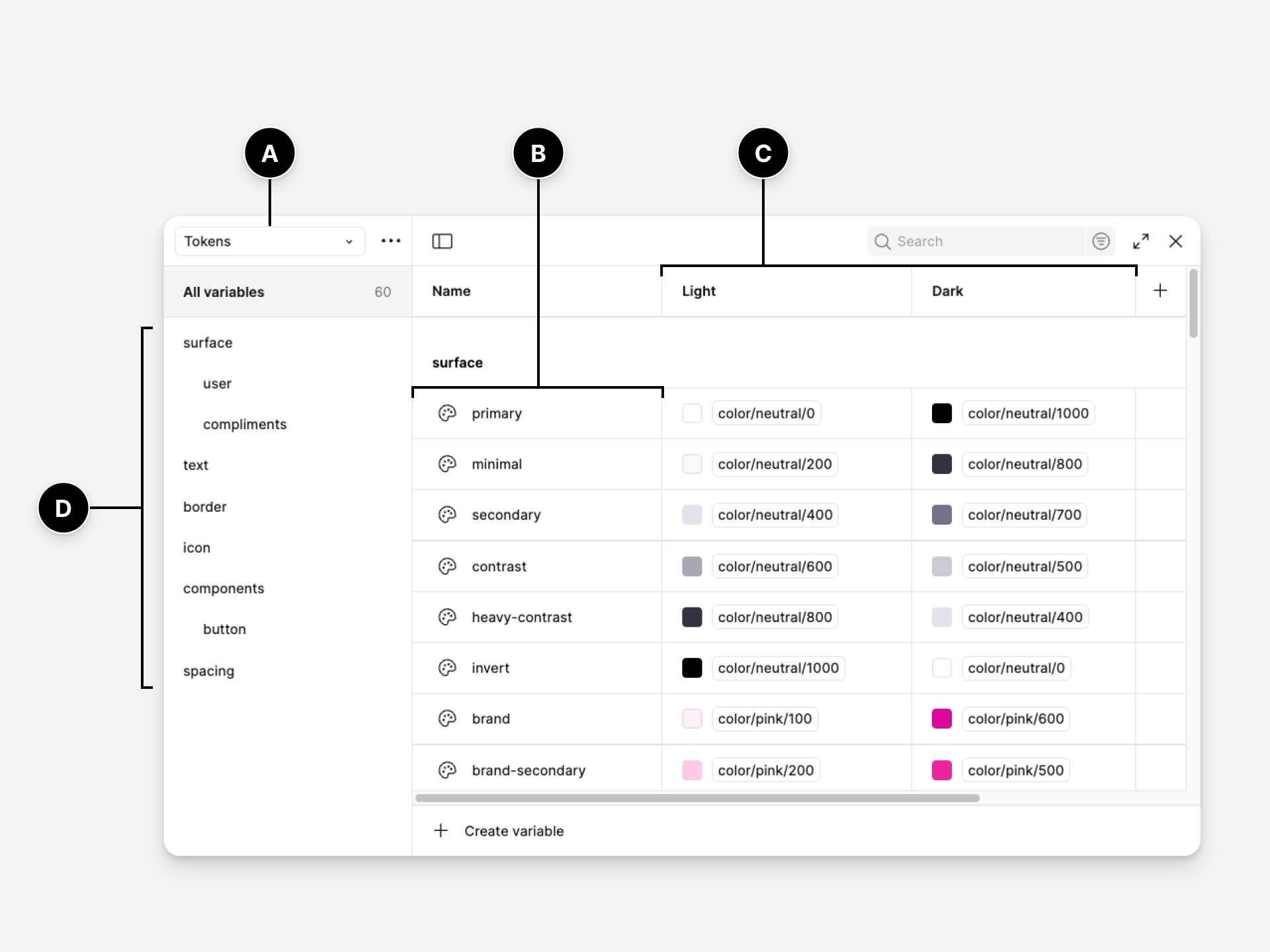
For teams that want their token layer to travel beyond one vendor, the Design Tokens Community Group published its first stable 2025.10 format, intended to improve interoperability across design tools and code pipelines. It is not a W3C standard, but the group says the core format is stable for production use and is already being implemented by major design tooling. (Sources: Design Tokens Community Group; DTCG FAQ.)
- Separate primitive values from semantic decisions where your system needs both.
- Use modes for genuine themes or contexts, not as storage for unrelated values.
- Add code syntax for variables used across implementation platforms.
- Keep naming equivalent enough across Figma and code that an agent can follow the relationship.
- Do not tokenize one-off values purely to increase token coverage.
Exit test: if the brand colour changes, neither a designer nor an agent should need to hunt through screens for hard-coded instances.
Step 4: Map Figma to Code
This is the step many “AI-ready design system” conversations skip. The agent needs to know that the Button in Figma corresponds to the Button your application already imports. Figma’s Code Connect exists for exactly this purpose. It maps published design components to real code components and can include property mappings, import statements, usage snippets and custom instructions in the context supplied to an AI agent. (Sources: Figma Code Connect; Code Connect MCP integration.)

An agent should import your Button, not invent another button that merely looks right.
For a mature system, begin with the components an agent is most likely to encounter: Button, Input, Select, Checkbox, Modal, Tabs, Table, Card, Alert and navigation primitives. Do not map a hundred components before you have tested ten.
Figma currently offers Code Connect through a UI and a CLI. The UI is faster for visual mapping and can connect to GitHub. The CLI gives deeper control over code snippets and templates. Figma now recommends its framework-agnostic template-file approach for new CLI implementations. (Source: Code Connect CLI quickstart.)
Exit test: when an agent sees a mapped component in a Figma frame, it should be able to identify the production import and expected usage instead of recreating the component with fresh markup.
Step 5: Connect Figma Through MCP
Only now does MCP become the main character. Model Context Protocol is an open protocol for exposing structured resources and tools to AI applications. Figma’s MCP server uses that mechanism to give supported agents access to design context, variables, screenshots, component mappings and, in newer workflows, write access back to the canvas. Claude Code is one supported client. (Sources: Anthropic MCP overview; Figma + Claude Code setup.)
Figma recommends its remote MCP server for most users because it has the broadest feature set. The desktop server remains useful for specific workflows, including selection-based prompting. The precise setup will continue to evolve, so use the current Figma documentation rather than copying a configuration command from an old tutorial. (Source: Figma remote MCP setup.)

A good first test is deliberately small: give Claude Code a link to one production-ready Figma frame and ask it to implement that frame using the existing component library. If the result creates custom buttons, raw colours or duplicated layout primitives, do not immediately blame the model. Inspect which context was missing.
Step 6: Give the Agent Rules
Structured context tells the agent what exists. Project rules tell it how your team expects that context to be used.
Figma’s own MCP guidance now recommends explicit rules such as fetching design context first, using a screenshot as visual reference, avoiding hard-coded values when tokens exist, following accessibility requirements and placing UI components in the established design-system path. Claude Code can keep shared project instructions in CLAUDE.md, which Anthropic describes as a place for architecture, coding standards and common workflows. (Sources: Figma MCP custom rules; Anthropic Claude Code project memory.)
## Design system rules

1. Fetch Figma design context for the exact node before implementation.
2. Use the corresponding screenshot to verify visual fidelity.
3. Reuse components from src/components/ui before creating new UI primitives.
4. Reuse design tokens and CSS variables. Do not hard-code colours, spacing or radii when tokens exist.
5. Prefer Code Connect mappings when a Figma component maps to production code.
6. Preserve keyboard behaviour, focus states and accessible names.
7. Do not add a new design-system component without explaining why an existing component cannot support the use case.
8. Run component tests and linting before considering the implementation complete.
That is not prompt theatre. It is design-system governance expressed in a form the agent can follow repeatedly.
Governance is becoming machine-readable. If a rule matters to the team, the agent should be able to read it.
Step 7: Validate the Output
Do not measure AI-readiness by how quickly a frame becomes code. Measure it by how little system debt the generated code introduces.
- Component reuse: Did it import existing components or rebuild them?
- Token compliance: Did it use the system’s variables and tokens?
- State coverage: Are loading, empty, error, disabled and responsive states handled?
- Accessibility: Does keyboard, focus and semantic behaviour survive implementation?
- Visual fidelity: Does the output match the design when compared with a screenshot?
- Code quality: Is the result maintainable by engineers who did not generate it?
Storybook is useful here because stories make component states inspectable and can double as browser-based component tests. The goal is not to add Storybook simply because “AI needs documentation”. The goal is to ensure the component system has an executable reference, not just a picture of what the component once looked like. (Sources: Storybook documentation; Storybook component tests.)
The useful metric is not design-to-code speed. It is the percentage of generated interface that arrives already inside your system.
Build a Round-Trip Workflow
The more interesting end state is not “Figma generates code”. It is a controlled loop in which design and implementation can inform each other without creating a second, hidden system.
- A designer or product team defines the problem and works from existing system components.
- The agent retrieves the exact Figma context, tokens and relevant Code Connect mappings.
- The agent implements the flow using the production library and project rules.
- Tests, visual comparison and human review catch drift.
- If implementation exposes a missing pattern, the team decides whether it belongs in the system.
- Approved changes are reflected back in Figma and the code library rather than living only in one side.
Figma is already building toward this model. Its current MCP tooling can read structured design context, expose code mappings and write native content back to the canvas in supported workflows. That means the most future-proof design system is not one that treats Figma as the sole source of truth. It is one where design intent and production truth can be reconciled continuously. (Source: Figma MCP getting started.)
This is also why tools such as Subframe and the newer code-first design category are relevant to the conversation. The competitive question is shifting from “can this tool generate UI?” to “does the generated work remain structurally continuous with the system that ships?”
Use This Readiness Score
Score one point for every statement you can defend with evidence:
- Our canonical components have clear semantic names in Figma and code.
- Important component behaviour is expressed through properties, variants or documented slots rather than duplicated frames.
- Layouts use structure such as Auto Layout rather than manual positioning where responsiveness matters.
- Reusable visual decisions are expressed through semantic variables or tokens.
- Important Figma variables have meaningful code equivalents or syntax.
- Our highest-use Figma components are mapped to their real production implementations.
- Our agent can access Figma through an approved MCP workflow.
- Project-level rules tell the agent which components, tokens and standards it must use.
- Component states have executable documentation or tests, not only static screenshots.
- We have tested a real design-to-code task and measured system reuse, accessibility and drift.
0–3: do not start with agent automation. Clean the system first. 4–6: you have enough structure for a controlled pilot. 7–8: the system is ready for repeated agent-assisted implementation with human review. 9–10: you are ready to experiment with genuine round-trip workflows, provided governance keeps pace.
What Design Leaders Must Change
For design leaders, AI-readiness changes the business case for design systems. The system is no longer only infrastructure that helps humans work consistently. It becomes the context layer that determines whether automated production reinforces your product language or slowly erodes it.
That means design-system work needs a slightly different roadmap. Semantic naming is no longer cosmetic hygiene. Token architecture is no longer only about theming. Code mappings are no longer a handoff convenience. Documentation is no longer complete if the important rule exists only in a workshop deck or in one senior designer’s memory.
There is also a governance trap. Do not give an agent permission to create new components every time it encounters a novel interface. Mature systems are valuable partly because they force teams to decide whether a new pattern deserves to exist. Agentic tooling should not quietly bypass that decision.
For the same reason, the emerging design engineer role may become unusually important inside design-system teams. Someone has to understand the Figma representation, the component API, the agent workflow and what actually ships. The work is not “prompting better”. It is maintaining continuity across the system.
The phrase “AI-ready design system” will probably disappear once this way of working becomes normal. What remains is a more demanding definition of a good design system: explicit enough for humans to use, structured enough for software to interpret, and governed tightly enough that automation cannot turn consistency into entropy.








For teams already connecting Figma to coding agents: where does the system break first in practice for you, naming, tokens, component mapping, agent behaviour or governance?