


Apple removed a switch. A developer built an app to put the choice back.
That may be the cleanest product-design story in AI this week.
macOS 27 no longer offers the single master toggle that previously let users disable Apple Intelligence. The individual features can still be controlled in different places, but there is no longer one obvious “I do not want this system participating” decision. In response, an open-source project called RemoveMacAI has become a small phenomenon. It can turn off Apple Intelligence features, delete local models, stop them downloading again and reverse its changes. The repository has accumulated more than 4,000 GitHub stars.
Meanwhile, LibreOffice has gone in the opposite direction at the product level. Its latest major release includes no built-in generative AI at all, and The Document Foundation is explicitly describing that absence as a feature. AI extensions are still possible. The default suite simply does not choose an AI provider, move document contents off the machine or insert an assistant into the interface on the user’s behalf.
The interesting tension is not AI versus no AI. It is who gets to decide when AI enters the product.
The next premium software feature may not be better AI. It may be the right to say no to it.
Apple Removed One Decision
The strongest argument for integrated AI is convenience. A system feature can be available everywhere, share context across apps and avoid forcing users to assemble their own stack. Apple Intelligence is particularly interesting because many capabilities use on-device models, which can offer meaningful privacy and latency advantages over cloud-only systems.
But integration changes the cost of refusal.
Ars Technica’s reporting on RemoveMacAI describes a familiar pattern: users can disable pieces of Apple Intelligence, but the clean system-level off switch is gone. A person who wants no AI now has to understand which features are separate, which models remain stored locally and which controls live where.
That is a product decision disguised as settings architecture.
A master toggle says “AI participation is one thing a user may accept or refuse.” Removing it says “AI is now part of the environment; you may manage its individual expressions.” The second position may make sense for Apple’s long-term platform strategy. It is still a reduction in user agency.
A Third-Party App Rebuilt the Missing Choice
RemoveMacAI is revealing because of what it actually does.
The project is not a dramatic jailbreak that tears AI out of macOS at the root. Its documentation says System Integrity Protection remains enabled, system files are not modified, and changes are journaled so they can be undone. The app exposes Apple Intelligence alongside analytics, ads, background processes and other system behaviors as things a user can inspect and deliberately switch off.
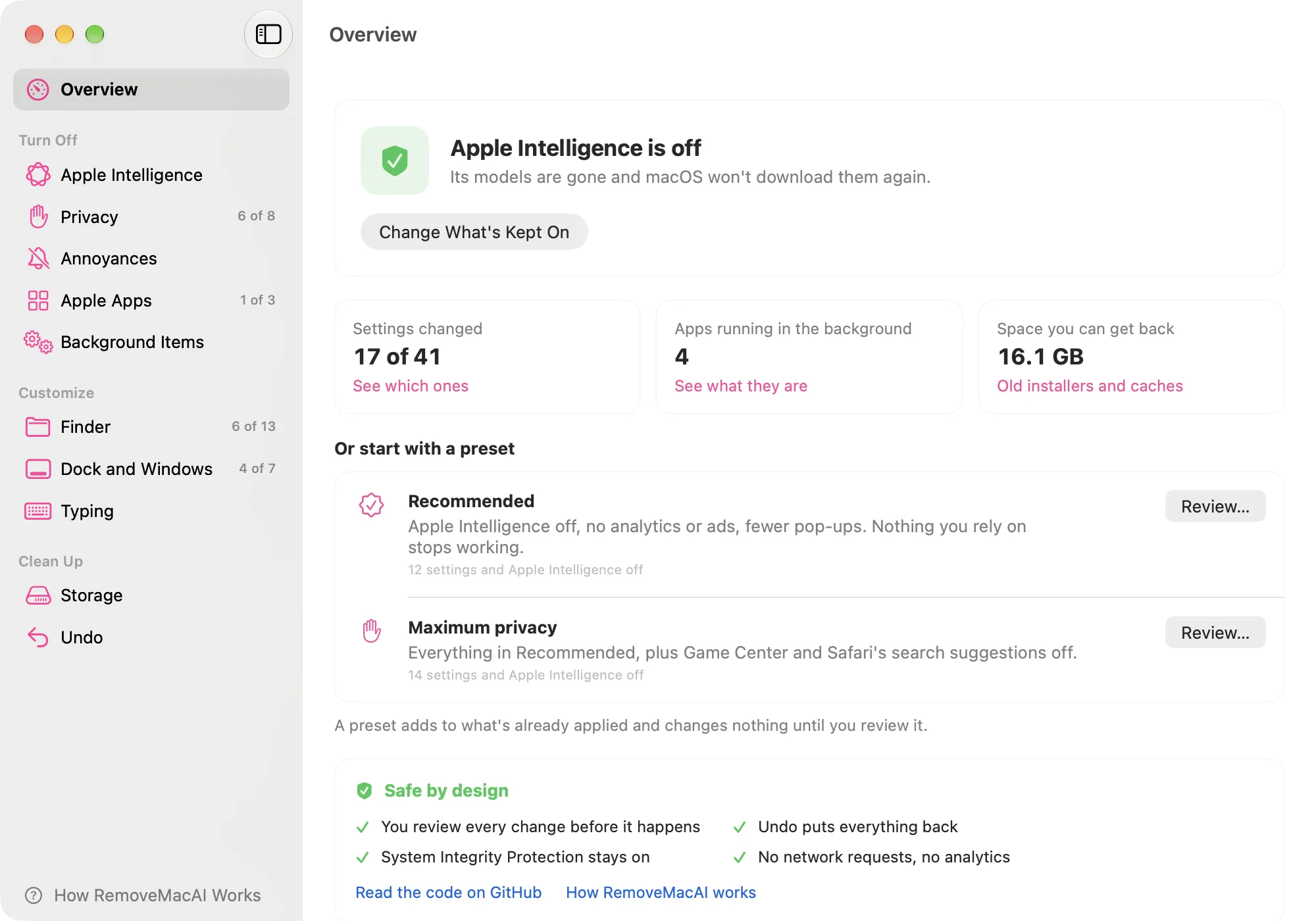
That interface is more interesting than the project’s name. It does not require the user to adopt a total ideological position on AI. The current tool lets people keep individual features they value. Its own issue tracker includes users asking for even more granular combinations, such as retaining Siri while turning other parts off.
In other words, the market signal is not simply “people hate AI.” It is “people want to choose the boundary.”
This is precisely where default AI integrations often go wrong. They treat acceptance as a binary product strategy but refusal as a scattered configuration problem.
An AI feature is not meaningfully optional if opting out requires more expertise than opting in.
LibreOffice Made Absence a Promise
LibreOffice approaches the same question from the other direction.
The Document Foundation’s “No AI is now a feature” statement is unusually concrete. The project does not reject AI in principle. It defines conditions under which an integration would be acceptable: users choose where inference happens, content does not leave the machine without authorization, telemetry is not required, the product is not locked to a single model provider, and the AI component can remain entirely optional.
That is a better design argument than “AI bad.”
For an office suite, documents are the product’s most sensitive object. They contain legal agreements, patient information, procurement documents, student records, financial models and unfinished private thought. The Document Foundation’s position is that the software should not quietly redefine the privacy boundary of those documents merely because generative AI became fashionable.
LibreOffice 26.8 went further by making the no-AI default part of its release positioning. The project said documents are not transmitted to remote services for processing and the suite does not require network access to function. In its September recap, The Document Foundation reported that the release crossed one million downloads in its first week. That does not prove people downloaded it because AI was absent. It does show that an AI-free default is compatible with meaningful adoption rather than automatically rendering a product obsolete.
The Real Product Is Choice Architecture
“Does this product have AI?” is becoming too crude a question.
A better set of questions is: Can the core workflow function without AI? Does the user know whether inference is local or remote? Can a feature be enabled for one task without giving the system permanent access to everything? Does turning it off actually stop the underlying processing? Does the choice survive an operating-system update? Can an administrator enforce the same boundary across thousands of devices?
These are interaction-design questions, infrastructure questions and business-model questions at once.
The ideal choice architecture is not necessarily one giant switch. Sometimes the right experience is layered: an obvious global control for people who want a clear boundary, followed by granular controls for those who want some capabilities but not others. The failure is forcing only one of those models.
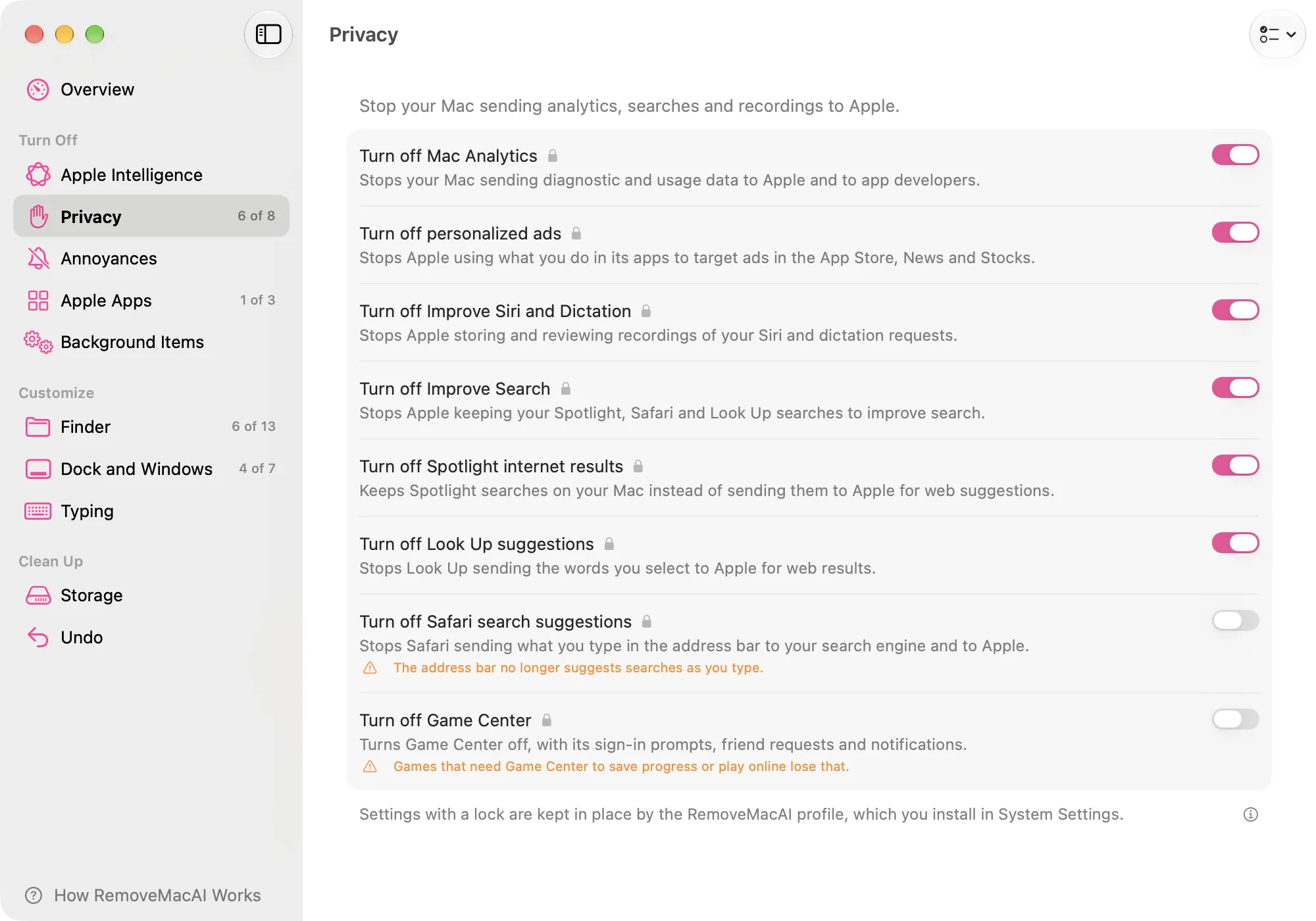
This is similar to the lesson in DW’s recent story about physical controls returning to the Kindle. Mature products do not always improve by forcing a single elegant interaction model on every context. Sometimes optionality is the more sophisticated form of minimalism.
Local AI Does Not End the Debate
There is a risk of turning “local AI” into an automatic ethical answer.
Running a model on-device can reduce data exposure and make offline use possible. Those are real advantages. But local execution still consumes storage, battery, memory and interface attention. It can still alter workflows a user did not ask to change. It can still produce errors. And if the operating system assumes the capability should always be present, a privacy advantage can coexist with a control problem.
The right question is therefore not whether the model lives on a server or on the laptop. It is whether the person can understand and govern its participation.
This distinction matters for product teams because “we process it locally” can become a shortcut around consent design. Locality should be one dimension of choice, not a substitute for it.
AI Fatigue Signals Product Friction
Every major software company is under pressure to demonstrate an AI story. Assistants are appearing in browsers, office suites, operating systems, design tools, customer support, analytics products and search interfaces. Many of these integrations are useful. Some are genuinely excellent.
But ubiquity creates a new form of product fatigue.
Users are not only evaluating whether an AI feature works. They are managing a growing portfolio of assistants, permissions, generated summaries, model selectors, context-sharing options and prompts. The cognitive overhead can become a tax even before privacy or quality enters the discussion. That is the less glamorous version of invisible UX: automation that recedes visually while quietly increasing the number of decisions a person has to govern.
DW’s guide to minimalist phones surfaced a similar behavior around smartphones. People were not abandoning technology. They were changing the amount of technology allowed to compete for attention. “No AI” can represent the same desire inside software: not a rejection of capability, but a demand for a calmer default.
That demand becomes more important when a product’s business incentive points the other way. Vendors benefit from AI engagement because usage justifies infrastructure, subscriptions and strategic investment. A user may benefit from less AI. Good product design has to survive that conflict rather than hide it in settings.
Measure Deactivation Too
Most AI product dashboards are built around activation.
How many users tried the assistant? How many prompts did they send? How many workflows involved AI? How much time was saved?
Those are reasonable metrics. They are also incomplete.
Teams should know how many people deliberately turned AI off, which capabilities they kept, how often they reverse an AI decision, whether they understand where their data goes and whether the non-AI workflow remains competitive. A high deactivation rate is not necessarily a failed AI feature. It may reveal a segment with a different risk tolerance, task profile or definition of quality.
The product opportunity is to make that segment visible rather than treating it as resistance to be designed away.
This matters especially for software used across many contexts. A designer may want image generation during concepting and no model involvement in a confidential client file. A lawyer may use AI for public research and disable it around privileged documents. A developer may enable cloud assistance on an open-source project and forbid it on proprietary code. One person can occupy several AI personas in the same day.
The future of AI software should include a first-class experience for choosing when the AI is absent.
The Better AI Product Knows When to Leave
None of this means software companies should stop integrating AI.
It means the integration has matured when absence is designed as carefully as presence.
A product that can explain what the model does, where it runs, what it can access and how to remove it is easier to trust than one that assumes adoption and treats refusal as an advanced preference. A product that preserves a strong manual workflow gains resilience when the model is wrong, unavailable, inappropriate or unwanted.
LibreOffice is making that position explicit. RemoveMacAI exists because Apple made it less explicit. Together they reveal a design gap that is going to become more valuable as AI becomes less novel.
For the last few years, adding AI has been a signal that software is modern. The next signal of product maturity may be whether the software remains excellent when the user says no.






Which AI feature would you keep if your operating system gave you a true global off switch for everything else?