
If you lead a UX or product design team, this guide gives you a concrete way to become AI-native without turning the practice into a prompt factory: which work to automate, which decisions must stay human, how roles and rituals should change, where research needs stronger guardrails, how to preserve critique and craft, what to measure, and how to move an existing team through the transition in 90 days.
The danger is not that design teams will use too little AI. The pressure is already moving in the opposite direction. Leaders are being asked to ship faster, designers are building more directly, researchers can synthesize mountains of data in minutes, and prototypes that once took days now appear before a meeting ends. The easier mistake is to mistake that acceleration for a new operating model.
An AI-native UX team is not a traditional design team with more subscriptions. It is a team that has deliberately decided where machine leverage belongs and where human responsibility cannot be delegated. That distinction matters because the valuable parts of design are not evenly distributed across the workflow. Generating ten interface directions is becoming cheap. Deciding which problem deserves attention, what evidence to trust, which trade-off is acceptable, and whether a polished answer is actually good remains stubbornly expensive.
Table of Contents[Open/Close]
- 1.AI-Native Does Not Mean AI-First
- 2.What Has Actually Changed
- 3.Protect the Practice First
- 4.Stop Measuring AI Usage
- 5.The AI-Native UX Operating Model
- 6.Redesign Roles, Not Just Tasks
- 7.Keep Research Accountable
- 8.Make Critique More Important
- 9.Give the Team AI Rules
- 10.The 90-Day Transition Plan
- 11.Measure Leverage, Not Velocity
- 12.The Team You Are Building
AI-Native Does Not Mean AI-First
“AI-first” sounds decisive. For a design organization, it is usually the wrong instruction.
It tells people to begin with a technology rather than a problem. It also makes adoption itself look like the outcome. A team can be extremely active with AI and still be slower at making decisions, weaker at understanding users, more inconsistent in its product language and less capable of explaining why anything shipped.
AI-native is a better concept if you define it more narrowly: the team assumes machine assistance is available throughout the workflow, but allocates it according to the nature and risk of the work. AI is infrastructure, not the brief.
The goal is not to put AI into every design task. It is to remove work that prevents designers from doing the parts of design that still require judgment.
This is consistent with the broader evidence on organizational AI. McKinsey’s 2025 global survey found that, among 25 organizational attributes it tested, redesigning workflows had the strongest relationship with seeing EBIT impact from generative AI. Yet only 21% of respondents at organizations using gen AI said their companies had fundamentally redesigned at least some workflows. (Source: McKinsey, State of AI 2025.)
That is the leadership problem. Buying the tool is easy. Changing the work without accidentally deleting the practice is harder.
What Has Actually Changed
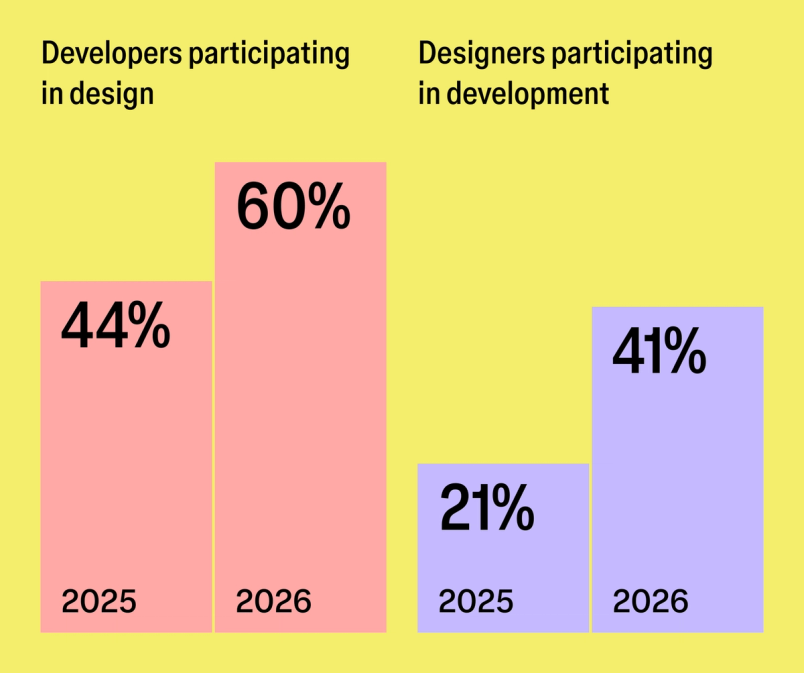
The boundaries around product work are already becoming more porous. Figma’s 2026 AI report, based on three years of research, 8,403 survey responses and 639 qualitative interviews, found that designers participating in development doubled from 21% to 41% in a year. Developers doing design work rose from 44% to 60%. Forty-one percent of respondents now say AI meaningfully changes how their teams work together, versus 7% two years earlier. (Source: Figma 2026 AI Report.)
That does not mean design is dissolving. In the same research, 90% said design was at least as important as before AI, and nearly six in ten said it was more important. This tension is the key to designing the team correctly: the activity is spreading while the need for high-quality judgment is increasing.
We have already argued in The Gates of Design Have Fallen that designers are losing their monopoly on design activity. The wrong organizational response is to conclude that specialist design capability is therefore less valuable. When everyone can generate something plausible, the ability to recognize what is coherent, differentiated, usable and worth shipping becomes more scarce.
The Harvard-led “Cybernetic Teammate” field experiment makes the distinction even more useful. In a randomized study involving professionals at Procter & Gamble, individuals using AI matched the performance of teams without AI on product innovation work, and AI helped bridge functional silos. But the published study also found that AI’s strength appeared particularly in improving idea generation, while human judgment retained value in evaluative selection. (Source: Organization Science, 2026.)
AI makes producing options cheaper. That makes choosing between them more important, not less.
Protect the Practice First
Before deciding where AI goes, decide what you are unwilling to lose.
For most strong UX organizations, the protected capabilities should include direct contact with users, disciplined problem framing, design critique, interaction and visual craft, accessibility judgment, evidence-based disagreement, systems thinking, ethical responsibility and the development of junior practitioners. These are not ceremonies to preserve because design teams have always had them. They are mechanisms for producing better decisions.
Figma’s 2026 State of the Designer study offers a useful warning against treating craft and autonomy as expendable. Among 906 designers surveyed globally, 89% said AI helped them work faster and 91% said AI tools improved their designs. At the same time, 87% said creative autonomy helps them do their best work, 91% said clear goals and expectations do the same, and 90% said collaboration is key to good work. (Source: Figma, State of the Designer 2026.)
That combination matters. The high-performing AI-native team is neither a collection of autonomous prompt jockeys nor a tightly scripted production line. People need more leverage and more clarity at the same time.
Stop Measuring AI Usage
One of the fastest ways to damage the practice is to turn AI adoption into a compliance metric. “Everyone must use AI every day” sounds progressive and teaches the team to optimize for visible usage rather than useful outcomes.
Instead, identify the frictions that currently consume skilled design time: rewriting research notes, producing low-risk variants, summarizing long documents, formatting specifications, generating placeholder content, checking repetitive states, drafting documentation, building disposable prototypes and translating known patterns into code. Those are candidates because removing them gives humans more room for judgment.
Do not begin with headcount. Begin with the work. Microsoft’s 2025 Work Trend Index proposes thinking in terms of a “human-agent ratio” for different tasks, and explicitly warns that too many agents per person can overwhelm the human capacity for judgment and decision-making. Product development is already one of the top areas leaders expect to accelerate with AI. (Source: Microsoft Work Trend Index 2025.)
The AI-Native UX Operating Model
This is the practical part. Take the recurring work of your design organization and place it into four lanes. The classification is more useful than a list of approved tools because tools will change faster than your decision rights should.
| Lane | Use AI For | Human Responsibility |
|---|---|---|
| Delegate | Repetitive, reversible, low-risk production | Set standards and spot-check output |
| Co-create | Exploration, prototyping, synthesis, variants | Steer, challenge, select and refine |
| Human-owned | High-context judgment and consequential decisions | Perform the work; AI may assist but cannot decide |
| Restricted | Sensitive data, unsafe research uses, prohibited contexts | Follow privacy, security and research policy |
Lane 1: Delegate
Delegate work when it is repetitive, easy to inspect and cheap to reverse. Examples include transcript cleanup, first-pass tagging of already-approved research material, repetitive component documentation, resizing or adapting known layouts, generating dummy data, producing accessibility test checklists, creating prototype scaffolding and translating an established component pattern into code.
The important phrase is established pattern. If the task contains a product decision hidden inside it, it belongs in a different lane.
Lane 2: Co-Create
Use AI as a collaborator when breadth and speed are useful but selection matters. This includes generating multiple interaction approaches, pressure-testing a flow, creating realistic prototypes, exploring content alternatives, identifying gaps in a research plan, clustering observations, comparing competitor patterns or turning a design into working code that a designer or engineer will review.
This is where the emerging design engineer becomes useful. AI can take a practitioner farther across the design-to-code boundary, but a person still has to understand the system well enough to notice when generated code, interaction or accessibility is almost right.
Lane 3: Human-Owned
Keep ownership human when the work determines what the product believes about people or what the organization chooses to do. Problem framing belongs here. So do the final interpretation of ambiguous user evidence, research consent decisions, prioritization, ethical trade-offs, consequential accessibility decisions, design-system exceptions, strategic product choices and the final call on what ships.
If nobody on the team can explain why a decision was made without referring to the model’s output, that decision was delegated too far.
Lane 4: Restricted
Every team needs an explicit no-go category. It might include uploading identifiable research recordings to unapproved services, generating synthetic findings and presenting them as user evidence, placing confidential roadmaps into consumer AI products, using unreviewed AI output in regulated experiences, or running automated research interactions where participants have not been told what they are interacting with.
The precise boundary depends on your organization. The important part is that people should not have to reconstruct it from Slack messages after something goes wrong.
Redesign Roles, Not Just Tasks
AI-native teams should become broader without becoming vague. Do not respond to new capability by rewriting every job description into “designer who does everything.” Instead, expand the radius of roles while keeping their core accountability legible.
- Product designers should move faster from idea to realistic prototype and, where appropriate, into production UI. Their accountability remains the quality of the experience and product decision.
- UX researchers can use AI for planning assistance, transcription, retrieval, coding support and first-pass synthesis. Their accountability remains evidence quality, methodology, participant protection and interpretation.
- Design-system practitioners increasingly own the context layer that lets both humans and agents reuse the product language. Our guide to making a design system AI-ready goes deeper into that infrastructure.
- Design operations should evolve toward workflow enablement: approved tools, data boundaries, reusable prompts or agents, learning programs, usage visibility and governance.
- Design leaders need to spend less time policing output and more time defining decision rights, quality bars, team learning and where speed actually matters.
Do not automatically remove junior roles because AI can produce junior-looking output. Figma design leader Jen Dunnam recently argued that early-career talent is a group she would deliberately invest in, pairing them with experienced practitioners, while emphasizing that critical thinking is becoming more important as polished AI output makes weak reasoning easier to hide. (Source: Figma interview with Jen Dunnam, 2026.)
A practice that automates away every beginner task without replacing the learning it provided eventually discovers that it has optimized away its senior pipeline.
Keep Research Accountable
Research is where AI-native teams can create enormous leverage and enormous self-deception.
Use AI aggressively around the research process where it reduces clerical work: draft screening questions, create discussion-guide alternatives, transcribe, retrieve quotes, create candidate codes, summarize long background documents and help researchers interrogate a dataset. But preserve a clear chain between a finding and the human evidence underneath it.
Do not let generated summaries become the evidence layer. A researcher should be able to move from a claim back to transcripts, sessions, observations or quantitative data and explain the interpretation. The concern becomes even sharper with synthetic users. As we found in Synthetic Users vs Real Users, simulations may be useful for hypothesis generation and exploration, but they do not magically become evidence about real people.
Brendan Jarvis made a similar distinction in our recent conversation about what AI still cannot see in user research: the risk is not only obviously bad output. It is plausible output that carries more confidence than the underlying evidence deserves.
Make Critique More Important
When teams can generate five plausible directions before lunch, critique cannot remain the occasional ceremony held after the work is mostly complete. It becomes part of the control system.
Keep a recurring design critique where the team is expected to disagree. Review generated and human-made work the same way. Ask what evidence supports the direction, which constraints shaped it, what the model may have normalized from generic patterns, what feels distinctive to your product, which edge cases are missing and what changed after speaking to users.
Dunnam describes a healthy team partly by whether people can voice dissent and fiercely debate one another, and calls the classic design critique an important place to build that critical-thinking muscle. That becomes more valuable when output is faster because visual polish no longer tells you much about the quality of the thinking behind it. (Source: Figma.)
The point is not to make critique slower. It is to make evaluation explicit before speed turns a plausible answer into product direction.
The faster the team can generate an answer, the more deliberately it needs a place where somebody is rewarded for saying no.
Give the Team AI Rules
Create a short AI practice guide. Not a 40-page policy nobody opens. A useful version can fit on one page and answer seven questions:
- Which tools are approved for company work?
- What data may never be uploaded to external models?
- Which tasks can be delegated, co-created or must remain human-owned?
- When must AI assistance be disclosed internally or to research participants?
- What evidence must remain traceable to its original source?
- Who reviews AI-generated code, research synthesis and customer-facing output?
- How does the team report a failure, hallucination, privacy concern or harmful pattern?
Then add workflow-specific rules where the stakes justify them. A research team needs stronger provenance rules than a designer generating placeholder copy. A design-system team needs rules against inventing new primitives when an approved component exists. A designer working on financial permissions needs more review than one exploring internal admin UI.
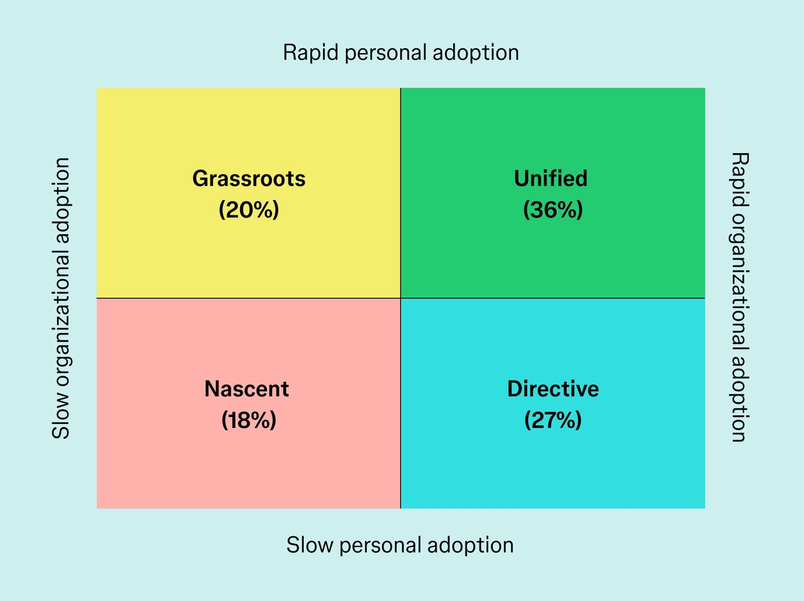
Standardize successful workflows, not prompts. Figma’s 2026 AI report found that organizations where AI adoption is either purely top-down or purely grassroots experience friction because leadership strategy and practitioner reality are disconnected. The report describes “unified” adoption, where individuals and the organization move forward together, as the goal. (Source: Figma.)
The 90-Day Transition Plan
Days 1–30: Map the Work
- Inventory the recurring tasks across product design, research, systems and operations.
- Classify each task into Delegate, Co-create, Human-owned or Restricted.
- Baseline current cycle time, rework, research quality signals and team sentiment for two or three workflows.
- Document approved tools and data boundaries.
- Select two pilots: one low-risk production workflow and one higher-value collaborative workflow.
Good pilots: prototype generation from an established design system; research transcript retrieval with mandatory source links; design-system documentation; accessibility review assistance; or turning a validated Figma flow into code with human review.
Days 31–60: Run Controlled Pilots
- Run the same workflow several times rather than trying ten unrelated AI experiments.
- Track where the AI genuinely removes work and where humans spend time repairing it.
- Hold a weekly 30-minute workflow review, separate from design critique.
- Capture reusable instructions, context and failure modes.
- Require practitioners to show the underlying evidence or system source when approving consequential output.
At the end of 60 days, kill pilots that are merely impressive. Keep the ones that reliably improve the work.
Days 61–90: Turn Learning Into Practice
- Publish the one-page AI practice guide.
- Turn proven workflows into shared team templates or agents instead of leaving expertise on individual laptops.
- Update role expectations only where the new workflow has proved durable.
- Add AI review questions to research reviews, design critiques and implementation QA.
- Give junior staff protected opportunities to practise foundational skills without AI doing the entire task for them.
- Choose the next two workflows based on measured value, not novelty.
The end state after 90 days is not an “AI transformation.” It is something more useful: a design team with two or three repeatable AI-enabled workflows, explicit decision rights, a shared safety boundary and enough evidence to decide what deserves to scale next.
Measure Leverage, Not Velocity
Do not celebrate because the team produced twice as many screens. More output is useful only when it increases the number or quality of decisions the organization can make.
| Measure | What to Watch |
|---|---|
| Cycle time | Time from validated problem to testable or shippable experience |
| Rework | How much AI-generated work must be rebuilt before shipping |
| System reuse | Use of approved components, tokens and patterns |
| Evidence traceability | Whether research claims can be traced back to real source evidence |
| Quality | Usability, accessibility, defects and design-review outcomes |
| Decision throughput | How many meaningful product questions the team resolves, not how many artifacts it generates |
| Team health | Autonomy, learning, confidence and whether critical thinking is increasing or atrophying |
Watch one additional metric informally: repair tax. If people repeatedly spend an hour cleaning up work that AI produced in ten minutes, the headline speed is misleading. Measure the complete workflow, including verification and correction.
The Team You Are Building
The strongest AI-native UX team will probably look less specialized at the edges and more disciplined at the centre. Designers will prototype and build farther. Researchers will manipulate larger evidence sets. Engineers will participate more directly in design. Product managers will create interfaces. Agents will handle chunks of production work that once justified meetings, tickets and handoffs.
None of that removes the need for a design practice. It raises the standard for one.
A healthy practice is the thing that teaches an increasingly fluid product organization how to frame problems, stay close to users, recognize quality, challenge plausible answers, maintain a coherent product language and decide what should exist at all. Those capabilities become easier to overlook precisely because the visible artifact can now be generated so quickly.
The design team survives AI by becoming less precious about who gets to make things and more rigorous about how the organization decides what is good.
If AI gives the team more capacity, spend that capacity on better questions, more realistic prototypes, closer contact with users, stronger critique, cleaner systems and better decisions. If all it produces is more output with fewer people thinking carefully about it, the organization has not built an AI-native design team. It has built a faster production line.





For design leaders already changing their team around AI: which part of the practice are you most determined not to lose, research depth, critique, craft, junior development, or something else?
[…] compression of the blank-canvas phase. It also aligns with a broader argument we have made about AI-native design practice: the best use of AI is often not removing professional judgment, but creating a better object for […]