
Artificial intelligence can generate interfaces in seconds. That does not mean it understands your product. The difference lies in something product teams have been building long before AI arrived: the design system.
Every new wave of design technology arrives with a familiar promise. This time, the promise is speed. Ask an AI model for a settings page, a checkout flow or a dashboard, and you’ll often receive something surprisingly polished within seconds. It is easy to look at those demonstrations and conclude that design systems are about to become less important.
The opposite may be true.
A design system has never been a collection of buttons, colours and typography styles. Those are the visible artefacts. The real value of a design system lies in the decisions it preserves. Why does this component exist? Which spacing token should be used? What happens when a button enters a loading state? Which interaction pattern has already been tested across the product? Good design systems answer those questions long before a designer begins arranging pixels on a canvas.
If you need the broader architecture first, our DesignWhine Guide to Design Systems explains how components, tokens, code, documentation and governance fit together. We have also explored why design systems fail, how to create one, and how to estimate the effort involved. Those fundamentals remain unchanged because AI has not replaced the need for governance, documentation or consistency. If anything, it has made them more valuable.
This article is the conceptual case for why AI needs that foundation. If you are already convinced and want the implementation layer, our practical guide to making a design system AI-ready covers semantic components, design tokens, Code Connect, Figma MCP, agent rules, production mappings and validation step by step.
The conversation has shifted elsewhere. Instead of asking whether AI can generate another component, product teams are beginning to ask a more practical question. How do we stop AI from inventing a different product every time we ask it to design something?
That question reveals an important truth. AI does not replace your design system. It reveals how good your design system really is.
The Problem Isn’t the Interface. It’s the Context.
One pattern appears repeatedly across conversations among design system practitioners. Very few people complain that AI cannot draw an attractive interface. Most modern tools can already do that. The frustration begins when those interfaces need to become part of an existing product.
A generated dashboard may look convincing, yet its buttons do not correspond to the component library. The colours are close to the brand palette but not quite right. Typography follows a different rhythm. Navigation introduces patterns the product has never used before. By the time the design reaches Figma, much of the generated output has to be rebuilt so it aligns with the system the team already trusts. Community discussions increasingly reflect this gap between visually impressive generation and production-ready consistency.
Most AI models begin with a prompt. Product teams, however, begin with years of accumulated design decisions.
This is not a failure of AI as much as it is a limitation of context. Most AI models begin with a prompt. Product teams, however, begin with years of accumulated design decisions. Those decisions live inside component libraries, design tokens, documentation, interaction patterns and engineering standards. A prompt captures intent for a single task. A design system captures intent for an entire product.
That distinction is becoming increasingly important because AI is moving beyond experimentation. It is entering workflows that affect products with millions of users. At that point, generating another attractive screen is no longer enough. The output has to inherit the language the product already speaks.
Your Prompt Is No Longer the Most Important Input
For the past two years, most discussions around AI design have centred on prompting. Designers have traded prompt libraries, refined wording and searched for the perfect instruction that produces a better interface. Prompt engineering certainly improves results, but it also creates the impression that prompts are the primary source of quality.
They are not.
Imagine asking an AI tool to create a CRM dashboard. The request is technically complete. It describes the feature, but almost nothing about the product itself. The AI has no knowledge of your spacing scale, accessibility rules, component hierarchy, naming conventions or interaction patterns. It fills those gaps using what it has already learned from the wider web. The result often looks polished because it resembles thousands of other SaaS products.
Now imagine providing the same request alongside your existing design system.
The AI can reference established components instead of inventing new ones. It can follow existing typography and colour tokens rather than approximating them. It can generate interfaces that feel related to the rest of the product instead of standing apart from it. The prompt still matters, but it is no longer carrying the entire workload.
A growing category of tools is moving beyond prompt-first workflows and treating the design system as foundational context.
That shift represents one of the more interesting developments in AI-assisted product design. A growing category of tools is moving beyond prompt-first workflows and treating the design system as foundational context. Rather than asking designers to repair generic output afterwards, these tools attempt to begin with the product’s own language. Moonchild, for example, allows teams to import an existing design system from Figma, GitHub or even live URLs before generating interfaces, so components, tokens and styles can influence the output from the beginning instead of being applied later.
Notice what changes in that workflow. The design system is no longer something AI has to imitate. It becomes something AI can reference.
That is a subtle difference, but it may prove to be one of the most important shifts in product design over the next few years.
Building With AI Starts Long Before Generation
One of the easiest mistakes to make when introducing AI into a design workflow is to treat it as the first step. A team discovers a new tool, writes a prompt, generates a few screens and begins evaluating the results. When the output feels inconsistent, the conclusion is often that the AI is not ready.
More often than not, the workflow is the problem.
Successful design systems have always relied on preparation. Components are named consistently. Tokens are documented. Patterns are reused because teams agree on them, not because a tool enforces them. AI benefits from exactly the same discipline. The more structured the underlying system, the less effort is spent correcting generated output later.
That is why the practical workflow has started to change. Instead of beginning with generation, teams are increasingly beginning with preparation.
The sequence looks something like this:
- Audit the existing design system and remove obvious duplication.
- Ensure tokens, components and naming conventions are consistent.
- Document interaction behaviour, not just visual appearance.
- Give AI access to that context.
- Review the generated output as a designer, not simply as an editor.
The important point is that AI arrives in the middle of the workflow, not at the beginning or the end. It accelerates exploration, but it still depends on the quality of the foundation beneath it.
That mirrors an idea we explored earlier in our article on why design systems fail. Systems rarely break because designers forget how to create components. They break because consistency slowly gives way to convenience. AI can accelerate that drift if the underlying system is already fragmented, or it can reinforce consistency if the foundations are strong.
Context Is Becoming More Valuable Than Prompts
The first generation of AI design tools rewarded better prompts. Designers experimented with wording, added constraints, refined descriptions and gradually learned how to steer the model towards more useful results. Prompting remains an important skill, but it is no longer the only factor separating generic output from production-ready work.
The next stage is about context.
A prompt can describe a dashboard. It cannot fully describe years of product decisions.
It cannot explain why a particular card component exists, why certain interactions have been standardised, or why a seemingly minor spacing rule improves readability across dozens of screens. Those decisions already exist inside a mature design system, waiting to be reused.
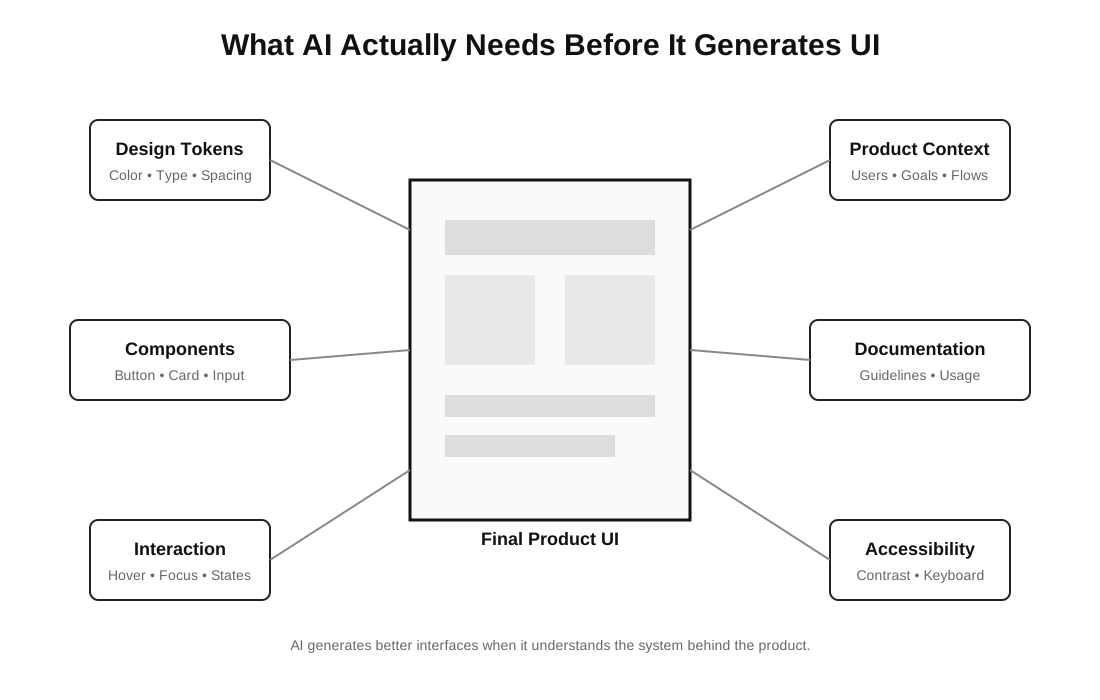
This is where the latest generation of design tools is taking a noticeably different approach. Rather than treating every project as a blank slate, they attempt to begin with the product’s existing knowledge. The design system becomes part of the input instead of something designers apply afterwards.
Tools like Moonchild fit naturally into that shift. Instead of relying solely on prompts, it allows teams to work from an existing design system imported from Figma, GitHub or even a live product. That gives the AI access to components, tokens and patterns that already define the product, reducing the need to rebuild generated interfaces from scratch.
The distinction may sound technical, but it changes the designer’s role in a meaningful way. Less time is spent correcting colours, spacing and components that should have been consistent in the first place. More time is available for evaluating whether the solution actually solves the user’s problem.
That feels like a healthier relationship with AI than expecting it to produce a finished interface in one attempt.
Your Design System Now Has a New Audience
For years, design systems served two groups of people.
Designers relied on them to create consistent interfaces. Developers relied on them to translate those interfaces into production code. Every component, token and guideline existed to help those two disciplines work from the same source of truth.
AI quietly introduces a third audience.
For the first time, another participant needs to understand the system. Not to admire it or document it, but to generate work that respects it.
The more important question is whether your design system is ready to teach AI how your product should be built.
That shift explains why organisations that invested in design systems years ago are finding themselves in a stronger position today. Their documentation, component libraries and design tokens are no longer useful only to humans. They also provide structured context that AI can learn from. Teams that skipped those foundations may discover that AI simply reproduces the inconsistency that already existed.
In other words, AI amplifies whatever system it inherits.
That is why the future is unlikely to belong to teams generating endless screens from increasingly elaborate prompts. It is more likely to belong to teams that have invested in a design language clear enough for both humans and machines to understand.
The conversation around AI in design has largely focused on what the technology can create. A more useful question is what it can learn from. Design systems, when they are thoughtfully maintained, offer one of the richest sources of product knowledge available to a design team.
The irony is difficult to ignore. For years, design systems were often seen as expensive internal infrastructure. They required patience, governance and continuous maintenance, yet their value was sometimes questioned because they rarely produced visible business outcomes overnight.
AI has changed that equation.
The organisations that spent years documenting their decisions may now be the ones best positioned to benefit from AI. Not because the technology replaces the work they have already done, but because it finally has something meaningful to build upon.
The question is no longer whether AI can help build a design system.
The more important question is whether your design system is ready to teach AI how your product should be built.
Design Systems & AI: Frequently Asked Questions
As AI becomes part of modern product design workflows, these are some of the most common questions teams ask about design systems, context, prompts, and AI-generated interfaces.
Can AI use an existing design system?
Yes. Modern AI design tools are increasingly able to work from an existing design system instead of relying solely on text prompts. By referencing components, design tokens, typography, spacing rules, and interaction patterns, AI can generate interfaces that are more consistent with an existing product. This reduces the need to rebuild generated designs so they align with your team’s established design language.
Why do AI-generated interfaces often ignore design systems?
Most AI-generated interfaces are created from prompts that describe a feature rather than the product behind it. Without access to an organization’s design system, AI has no knowledge of approved components, accessibility standards, naming conventions, or interaction patterns. As a result, the generated UI may look polished but often feels disconnected from the product it is supposed to extend.
Can AI generate UI directly from a Figma design system?
Some AI tools are beginning to support this workflow. Instead of treating a prompt as the only source of information, they use an existing design system as structured context before generating interfaces. For example, Moonchild allows teams to import design systems from Figma, GitHub, or even live products so AI can reference existing components, tokens, and patterns from the start rather than approximating them afterwards.
Does AI replace design systems?
No. If anything, AI makes design systems more valuable. A design system captures years of product decisions, including components, design tokens, accessibility standards, and interaction patterns. AI can accelerate interface generation, but without that underlying context it often produces inconsistent results. Rather than replacing design systems, AI depends on them to generate interfaces that fit an existing product.
Why is context more important than prompts in AI design?
Prompts describe what you want to build, but context explains how your product should be built. A mature design system contains reusable components, documented patterns, design tokens, and product knowledge that a prompt alone cannot capture. As AI becomes part of everyday design workflows, providing rich product context is becoming more important than simply writing better prompts.
Which AI tools support design systems?
A growing number of AI design tools are beginning to incorporate design systems into their workflows. Moonchild is one example, allowing teams to import design systems from Figma, GitHub, or live products before generating interfaces. As AI-assisted design matures, support for structured product context is likely to become a standard capability rather than an optional feature.





[…] Good UI doesn’t begin with Figma. It begins with understanding the product.Read also: Creating Design Systems with AI: Why Context Matters More Than Prompts […]
[…] technical and design judgment to recognise the “almost”. This is also why our argument in Why AI Needs a Design System Before It Can Design Anything matters here. Generation becomes much more useful when it operates inside constraints you […]